
Introduction
Since 2018, Hungary has had a real-time reporting requirement (Real-Time Invoice Reporting, RTIR / Online Számla) for invoices issued to VAT-registered companies (or private individuals) in Hungary. Since 2020, the previous threshold (e.g., minimum amount) has been abolished—all invoices issued must be reported, regardless of the sales amount.
An XML format is provided for reporting to NAV (tax authorities). The XML file may only contain one invoice at a time. If there are several invoices, separate XML files must be generated and transmitted for each one.
After successful transmission, you will receive a confirmation or feedback from the NAV system.
Legal information
Retarus strongly recommends consulting a local tax advisor regarding tax law issues. The information provided here is not guaranteed.
Real-Time Invoice Reporting RTIR
The Real-Time Invoice Reporting RTIR of invoices is divided into several steps, which are described below.
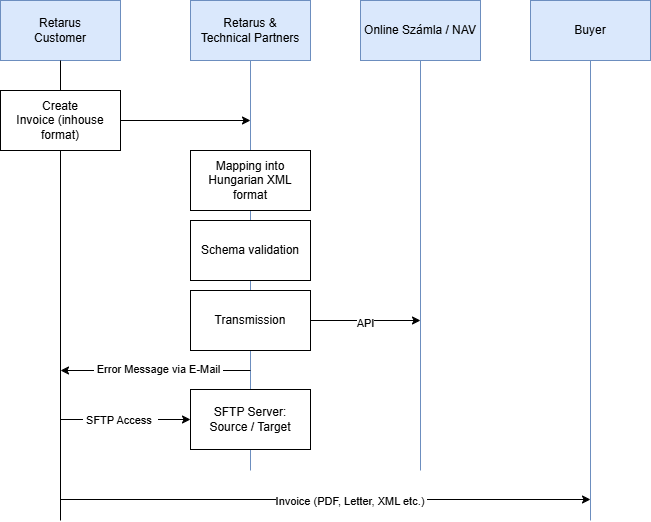
Step 1 – Creation and transmission
The Retarus customer creates an electronic invoice in their ERP system and sends it to Retarus in an internal (and documented) format (source format). The transmission protocol can be selected from a variety of existing standard protocols (such as tRFC, AS2 or SFTP).
Step 2 – Data processing and transmission to Online Számla Platform
Retarus converts the source format into the required XML Hungarian target format. The resulting XML document is validated in a further step. The currently valid Schematron from Peppol is used for this purpose. If the check fails, the invoice is not reported. A verification report is generated and sent to the customer via email. If the verification is successful, the invoice will be reported to Online Számla Platform.
Step 3 – Archiving process
Once Retarus has successfully transferred an invoice, it transfers the source and target documents to a Retarus SFTP server. The customer is given access to this server and can retrieve these documents for further processing within 30 days before they are automatically deleted.
Step 4 – Transmit Invoice to recipient
The Online Számla Platform does not include the transmission process of the invoice to the recipient. The customer must transfer the invoice directly to the recipient. The format and transfer method chosen are subject to agreement between both parties.