
Introduction
On 22 March 2024, the German Bundesrat approved the Growth Opportunities Act. This legislation introduces mandatory e-invoicing for transactions between taxable persons established in Germany (B2B transactions). The e-invoicing obligation will be the first step to the introduction of an e-reporting system. According to the approved legislation, taxpayers will need to issue and receive structured electronic invoices for transactions in scope of the mandate. E-invoices will in principle need to comply with the European e-invoicing standard CEN 16931 (which means that the existing XRechnung and ZUGFeRD formats should generally be acceptable).
Specific rules are foreseen for EDI procedures, which will remain possible under conditions (e.g. extraction into EN16931). In the envisioned model, the transmission of the structured e-invoice between taxable persons will not be regulated, meaning that there would be no requirement to send e-invoices to the tax authorities for verification/clearance of the e-invoice before issuance. Some transactions will be excluded from the e-invoicing obligation such as simplified invoices (max. EUR 250), VAT exempt transactions without the right to deduct input VAT, passenger transportation tickets and B2C sales. Germany has received approval from the Council of the European Union to mandate B2B e-invoicing. The decision takes effect from 1 January 2025 to 31 December 2027 (or until the moment ViDA is adopted).
https://www.recht.bund.de/bgbl/1/2024/108/VO
-
January 2025: taxpayers must be able to receive e-invoices from their suppliers. Paper invoices can only be used with the consent of the invoice recipient. During 2025 and 2026, both the e-invoices and paper invoices will be valid.
-
January 2027: taxpayers with an annual turnover exceeding EUR 800,000 will have to issue e-invoices.
-
January 2028: all German taxpayers will have to issue e-invoices.
Legal information
Retarus strongly recommends consulting a local tax advisor regarding tax law issues. The information provided here is not guaranteed.
Inbound invoices
Step 1 - Receiving invoice
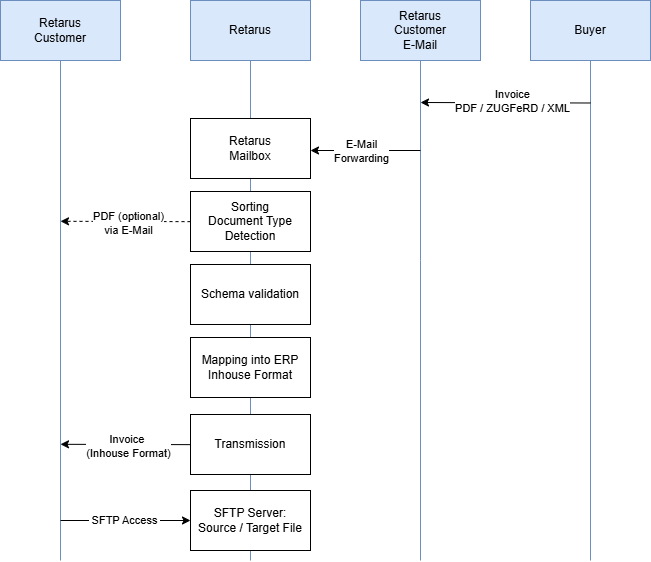
The customer receives the invoices as usual in one of their own email inboxes. The customer is responsible for archiving the inbox in accordance with the law. The customer then forwards the emails received there to a Retarus mailbox either automatically or manually. Retarus accesses this internal mailbox and extracts the attachments. Multiple invoices or attachments are allowed per email (max. 17Mbytes), but the attachments are handled individually in the follow-up process. The email body is ignored.
Step 2 - Pre-sorting
During pre-sorting, XML files and PDF files that have a ZUGFeRD-specific attachment are separated from the rest of the attachments. ZUGFeRD documents are recognized by the fact that they have a file attachment with the file name factur-x.xml, zugferd-invoice.xml, ZUGFeRD-invoice.xml or xrechnung.xml. The specified ZUGFeRD profile and the standard version used are not relevant for the presorting.
The remaining attachments are either deleted or can be returned to the customer by email. In this case, Retarus attaches the original EML file of an email message to the email sent to the customer. Please note that any documents accompanying the invoice must be embedded in the XML file (including ZUGFeRD).
Step 3 - Validation
The native XML or the XML attachment of a ZUGFeRD file are submitted to a validation process in the following step. First, the document type is automatically determined (e.g., CII, UBL, ZUGFeRD Profile x, etc.). The appropriate Schematron is selected to validate the document based on the recognized document type.
If the check is successful, the data is converted into the desired in-house format. Any file attachments are also encoded into the target format as agreed. The data is then transferred to the customer's system. If the check fails, Retarus' error message is attached to the original email and sent to the customer. Nevertheless, an attempt will be made to process the document. This means that the customer decides whether to accept the document or not.
Step 4 - Conversion and document delivery
After the validation, the received XML document is converted into the customer's in-house format and delivered to the customer via an agreed transmission channel.
Step 5 – Archiving process
Once Retarus has successfully transferred an invoice, it transfers the source and target documents to a Retarus SFTP server. The customer is given access to this server and can retrieve these documents for further processing within 30 days before they are automatically deleted.
Options
Peppol
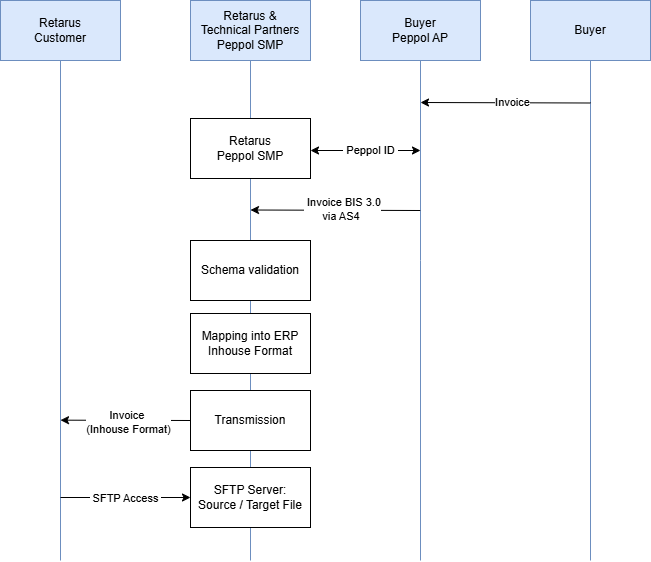
Peppol is an EDI network that allows any number of network participants to send documents to the recipient via a so-called Peppol ID. Peppol can be set up either instead of the e-mail inbox or in addition to e-mail. Only XRechnung or Peppol BIS 3.0 invoices in UBL or CII data format can be transmitted via Peppol. It is not possible to send or receive other data (including ZUGFeRD) in the Peppol network, which means that this channel can be considered to be single-purpose compared to email.
Retarus sets up a Peppol ID for the customer that can receive both UBL and CII data. Although the sender is responsible for sending only valid and verified documents, Retarus still checks the documents for validity.
If the check is successful, the data is converted into the desired in-house format. Any file attachments are also encoded into the target format by agreement. The data is then transferred to the customer's system. If the check fails, Retarus' error message is attached to the original email and sent to the customer.
PDF creation
To visualize XML data, Retarus can create a PDF file. To do this, Retarus uses a template provided by KoSIT (Koordinierungsstelle für IT-Standards) or FeRD. You have no influence on the design or the data fields displayed. The PDF file can be encoded in the target file (Base64) or sent separately to the customer by email.
IDP service
When receiving invoice data via email, PDF invoices may still be included until 2027. To be able to digitize these as well, the Retarus IDP service can be integrated into the process.
The IDP service captures PDF invoices and, if the capture is successful, makes them available automatically. If a certain “confidence” level is not reached during the capture, the document is “parked” and made available to the customer for inspection and processing. Further information can be found in the IDP service description.