
Welcome to Retarus Support
At Retarus, we constantly strive to make your service experience as smooth as possible. With our global team of dedicated, experienced, and highly qualified support professionals, we are committed to providing dependable services in compliance with contractual and legal obligations (e.g. GDPR) and put great effort into speedily resolving any issues that may arise.
This Retarus Support Guide provides you with practical guidance for obtaining support from Retarus. The guide contains an overview of the support processes and information required to ensure that your support experience is as transparent, efficient, and effective as possible.
To enable us to provide you with the best possible support in all service matters, we advise you to pass this Support Guide on to all authorized colleagues.
The Retarus Support team offers comprehensive assistance to ensure an excellent support experience, including but not limited to:
-
ProblemAnalysis and Resolution
-
Message Tracking
-
Training in Services and Tools
-
Technical Support
Contacting Retarus Support
Retarus Support is a tool that extends to your company’s operations. As such, we provide access to support specialists who assist you with service-specific operational issues around the world. Depending on which Support Service Level you have opted for, we provide up to 24/7 support.
Regardless of time, location, or date, Retarus provides support for its customers to ensure their business processes continue operating as they should. If you require individualized support with dedicated contact persons, our Extended Support and Service Management represent attractive options (see also Advanced Support).
You can reach Retarus Support using one of the following channels:
-
Online Ticket Submission via the Support menu in the Enterprise Administration Services (EAS) portal https://eas.retarus.com (see also Frequently Asked Questions).
-
Contact your local Retarus Support. Details can be found in the following table:
|
Support |
Phone |
|
Online Portal |
|---|---|---|---|
|
DE |
+49 89 5528 2525 |
|
|
|
US |
+1 844-RETARUS |
||
|
SG |
+65 3163 4488 |
||
|
AU |
+61 2 9191 4900 |
||
|
ES |
+34 91 78938 01 |
||
|
FR |
+33 1 871663 01 |
||
|
IT |
+39 02 873178 61 |
||
|
AT |
+43 12058 3461 |
||
|
CH |
+41 44 200 11 39 |
||
|
UK |
+44 207 17303 71 |
Support Fundamentals
This section covers fundamental aspects of obtaining support, such as service levels, the EAS portal, and roles.
Support service levels
Depending on the details of your contract, you are assigned a specific service level. If you're unsure which level applies to you, please refer to your contract or visit our Terms and Conditions page to review the default SLAs. This determines the following details:
-
Service times
When and at what time support is available to you. -
First response times
The maximum time it will take until a first reaction is sent following the opening of a ticket. In order to be able to bundle resources for fault clearance in the event of a major outage, notification via the Retarus status page replaces the initial ticket response time. -
Resolution times
The maximum time it will take to respond to an inquiry or resolve an issue.
For more information on classification (e.g. Class 1 or SRQ Express), see Ticket classification.
Retarus Enterprise Administration Services (EAS) portal
The Retarus Enterprise Administration Services (EAS) Portal is a web-based portal available at https://eas.retarus.com/. There, you will find a wide range of tools and information on your Retarus services
and support:
-
Product documentation (see Where to find product documentation in the EAS portal)
-
Overview of the support inquiries (see How to check the current status of a ticket via the EAS portal)
-
Configuration of services
-
Reports and statistics including call data records
-
Monitoring
-
User account management (see How to manage user and admin accounts for the EAS portal)
-
Management of authorized support contacts (see How to maintain the list of authorized support contacts via the EAS portal)
Efficient utilization of the EAS portal’s user capabilities will enhance your service and support experience. If we can be of any assistance in this regard, please let us know. We will be happy to provide you with our in-depth expertise and share our experience.
Roles and responsibilities
Based on the specific situation in a support case and the cooperation required on all sides, a range of different people have important roles in dealing with support requests.
Roles on the customer side
On the customer side, there are different roles when using the Retarus services. Such roles can be assumed by both individuals and groups. Also, more than one role can be assumed by an individual or group. These roles usually reflect structures or are determined by guidelines on the customer side. Compliance with these guidelines is the sole responsibility of the customer.
EAS Administrator
Users who are permitted to alter your service configuration need to be given an account with the Customer Admin security level. These users are not only able to use all capabilities offered by the portal but are also responsible for the following:
-
Creating and removing user accounts as required (see How to manage user and admin accounts for the EAS portal)
-
Unlocking user accounts following too many failed login attempts (see How to manage user and admin accounts for the EAS portal)
-
Supporting other users with resetting passwords (see How to reset passwords for EAS accounts)
-
Ensuring that the list of authorized support contacts remains up to date (see How to maintain the list of authorized support contacts via the EAS portal)
We have found that depending on the organizational structure on the customer side, it can be useful to distribute responsibilities across various departments or individuals.
When third-party providers are involved (e.g., outsourced user help desk), you should consider granting your third-party staff access to the EAS portal. For such cases, it is also possible to restrict the authorization in an even more granular way.
EAS User
For users who do not need to make any configuration changes in the EAS portal, a regular EAS user account with the Customer Staff security level is sufficient. Such users do not have any additional responsibilities.
Authorization of the Support Contact
In principle, only authorized support contacts are allowed to open tickets. This is required because support services can incur charges. For more information on how to maintain your organization’s list of authorized support contacts, see also How to maintain the list of authorized support contacts via the EAS portal.
Important notice
In accordance with the process landscape established at Retarus (ISAE 3402 SOC1 / SSAE16 Service Desk process), the Retarus support team will only process requests submitted by authorized contact persons. The person(s) currently registered with Retarus for your company and its respective customer number can be found in the EAS portal under the Support / Support contacts menu item. The administrator login is identical to their email address, unless it has been changed by you. If you have you forgotten your EAS password, please click on Forgot your password? on the EAS start page.
As the administrator responsible for your company’s EAS portal, please check the names of all authorized persons currently listed in the EAS. If required, please change, add, or delete the corresponding names as promptly as possible.
Required information is first name, last name, and email address. Optionally, you can also enter telephone and mobile phone numbers. If entries are not updated by the specified date, we will assume that the employees currently listed are authorized by you to submit requests to Retarus’ support.
Please note that unauthorized persons cannot make any inquiries to Retarus’ support. Everyone must be
authorized in writing before submitting an inquiry.
In case of receiving security-relevant information which could disrupt or influence operation or service, please send this information to support@de.retarus.com. For all the country-related addresses, see Contacting Retarus Support.
Roles on Retarus side
At Retarus, we bring people together with different areas of expertise and with a variety of technical backgrounds working in different departments.
-
Support Specialist
Our support specialists handle all requests related to our services for all customers and route them to the various expert teams. -
Service Engineer
These experts handle specific requests related to their field of expertise. Requests spanning multiple fields are often handled by a team of experts from different areas, such as services, applications, infrastructure, and networks. -
Service Manager
A service manager provides additional individualized support and services (see also Service management). -
Service Implementation Engineer
Implementation engineers are responsible for technically setting up and expanding services. -
Technical Consultant
Technical consultants support our customers with inquiries beyond the regular support and offer their in-depth expertise and a broad range of experience in using our services (see also Technical consulting). -
Sales Representative
Contact person for all contractual matters, orders, service expansions, etc.
Support Tickets
Retarus uses a ticket system for tracking any service or change requests, issues, or incidents. A ticket references to a specific inquiry and documents all related information, communication, and results in the same place.
Opening a ticket
When contacting Support (see Contacting Retarus Support) regarding a new issue, Retarus will open a ticket for you. In case the person contacting Support is not on the list of authorized contacts (see Roles on the customer side) managed by the customer via the EAS portal (see Retarus Enterprise Administration Services (EAS) Portal and How to maintain the list of authorized support contacts via the EAS portal), the opening of the ticket will be denied. Only in case of a reported incident confirmed by Retarus Support the support specialist may open a ticket first and get authorization later.
Mandatory information
When opening a ticket, please make sure that the following is taken into account:
-
The person or email address is on the list of authorized support contacts (see Roles on the customer side. Always make sure the list of your organization’s authorized support contacts is up to date (see How to maintain the list of authorized support contacts via the EAS portal).
-
A thorough error analysis within your own infrastructure and applications has been performed to eliminate issues within your sphere of influence.
-
An objective assessment of the impact and urgency of a potential issue has been carried out.
-
All information collected during any prior analysis regarding the issue and all available technical details are being provided.
The following matrix lists the essential information that should be provided when submitting support requests. By providing all this information with the opening of the ticket, the support team is able to start processing your inquiry right away, without having to request missing or clarify incomplete information.
|
Type of information / Inquiry - as applicable |
Incident |
Service Request |
Change Request |
|---|---|---|---|
|
Customer number |
✔️ |
✔️ |
✔️ |
|
Contact person(s) with telephone number |
✔️ |
✔️ |
✔️ |
|
Description of the request, the issue and the impact |
✔️ |
✔️ |
✔️ |
|
Details on the impacted transactions (time-stamp/status/destination/sender) |
✔️ |
✔️ |
|
|
Was it possible to reproduce the error and which steps were taken to reproduce it? |
✔️ |
|
|
|
Which steps has customer support already taken to identify or solve the issue? |
✔️ |
|
|
|
Do you give Retarus permission to send test transactions? |
✔️ |
|
✔️ |
|
Has this issue already occurred previously? |
✔️ |
|
|
In addition to providing all necessary information in advance, experience has shown that tickets can be processed more quickly and in a more satisfactory manner if the customer contact is familiar with the customer infrastructure and processes, as well as the Retarus services and interfaces. For this reason, we offer you an initial support training session free of charge during implementation phases. A glance at the EAS portal's monitoring and reporting features as well as the maintenance and incident notifications from Retarus status page can often clarify issues in advance.
If you have outsourced your support to a third-party provider or plan to do so in future, you are advised to take care that your providers are familiar with the Retarus Support basics and our working procedures. If you require assistance in getting your colleagues or partners familiar with our support processes, Retarus’ training services can also be ordered separately.
Urgent requests
In all cases where you need urgent assistance from Retarus Support, it is highly recommended that you contact the support team by email as well as by phone. Via email, customers should provide all necessary technical details and information regarding the request. By phone, customers are able to communicate the impact and urgency of the request and answer any open questions.
In this way, it may also be possible to provide you with an initial assessment from Retarus’ point of view and customers may be able to use this information to further investigate the situation. Through this cooperation between the customer and Retarus, it may be possible to solve certain issues more quickly.
Ticket classification
Each new support or service request will be classified according to the type of query, priority, impact, and urgency. In general, inquiries are divided into incidents, changes, and service requests (SRQ).
Incidents are inquiries where customers report that services are not fully available. These could include the following scenarios:
-
A service is working, messages are delivered successfully to the recipient, but certain non-essential aspects of the service are not available.
-
A service is working, but delivery of messages may be delayed.
-
A service is not available (e.g., connection timeout to service interface)
Change inquiries are where customers request modifications to their service configurations. When handling these changes, a distinction has to be made between standard and non-standard changes based on the risks involved.
-
Standard changes subject to a low level of risk are processed as service requests (see below).
-
Non-standard changes subject to a higher risk level are not handled through the regular service request procedure, but rather via placing an order which will be carried out by a service implementation engineer.
Service requests (SRQ) are other inquiries not related to non-standard changes, service availability, or impairment. These could include:
-
General questions about the use of our services
-
Research into and analysis of the processing of specific messages
-
Pre-defined configuration changes that are subject to a low level of risk (standard changes)
Please see the table below for an overview of inquiry classification.
|
Classification |
Description |
|---|---|
|
Incident Class 1 |
Critical errors: Retarus’ services are not available for a sustained period of time. |
|
Incident Class 2 |
Substantial errors: The use of several key functions of the services is not only temporarily impacted. |
|
Incident Class 3 |
Minor errors: Services show errors which are neither critical nor substantial. |
|
SRQ Standard |
General request not based on an actual incident. |
|
SRQ Express |
Same as SRQ Standard, but containing a request for accelerated processing with extra charges. |
Should you have the impression that the classification does not reflect the impact and urgency of your issue, please contact the Retarus Support team and provide a more detailed description or further information about the issue and impact. We will review your request and reclassify the ticket if necessary.
Processing tickets
After a ticket has been opened via email or phone, the responsible support specialist will check all information provided and assign a priority level to the ticket. An authorized contact opening a ticket will receive an email response containing the Ticket ID (e.g., “RCR 1234567”) in the subject line and the initial priority. The email may also ask for missing or additional information. In urgent cases, the support specialist might also call the requestor if a phone number is available.
If all required information regarding the issue is provided, the support specialist can process the ticket right away. This includes the initial research and analysis. On the basis of these preliminary results, the subsequent course of action will be planned, a service expert might get involved, etc. The support specialist will keep the requestor informed about the progress.
Please always include the Ticket ID, enclosed in square brackets (e.g.: [RCR 1234567]), in the subject line of all email communication with Retarus Support, and always include the support email address in the “To” field of your email messages. This ensures that all email communication regarding the ticket is automatically added to the ticket record and the responsible support specialist is notified accordingly.
Resolving tickets
Depending on the specific inquiry, the support team will compile a conclusive answer. This answer may include all requested information, a workaround to remedy an ongoing incident, or detailed information on a resolved issue. The time of this response, provided that you do not raise any objections, is considered the resolution time with respect to your service level agreement. The ticket will not be closed if you need more time for testing or request further information.
A reported issue is not considered resolved until a support specialist has fully diagnosed the problem, recommended a solution, and either Retarus or the customer has successfully implemented the solution or an appropriate workaround. The technical engineer will not close the support ticket until the customer confirms that the issue has been resolved. In some cases, you may be notified that the ticket is set to auto-close within a specified time period if you do not have any further questions or issues.
Closing tickets
Once an issue has been resolved, customers often need time to confirm the solution, analyze the information provided, implement the workaround etc. Retarus Support will continue to do everything in its power to support you in this phase. Often customers receive notification that the ticket will be closed automatically in 10 days for their convenience if there are no further questions. If these 10 days expire without any further feedback, we assume the issue reported in the ticket has been fully resolved. Therefore, the ticket will be closed.
Escalation of tickets and complaints about ticket charging
Ticket complaints/escalations and invoice complaints are two separate processes that are addressed to different departments.
Ticket escalation
Retarus Support always strives to resolve any service outage in a timely manner. Should delays still occur, however, it may become necessary to escalate the trouble ticket to higher levels of management. Escalation may be initiated by the customer or may result from automated systematic escalation policies.
If you think that your issue is not being handled in a timely manner, or that Retarus staff members are not sufficiently responsive, you can initiate the escalation process by calling the Retarus Support. After contacting a Retarus Support specialist, you will be able to request that the ticket be escalated to a higher management level to speed up the resolution time of your issue.
When escalating a problem, you will need to provide the following information:
-
Company name
-
Caller's name and telephone number
-
Retarus ticket number(s)
-
Support description (e.g. out of service, service degraded, etc.)
-
The action or resolution requested
Your escalation should be addressed to the designated Retarus contact for the corresponding escalation level as shown in the table below.
|
Escalation level |
Contact |
Function |
Escalation to next level |
|---|---|---|---|
|
1 |
Global Support Team |
If needed |
|
|
2 |
Functional Leads Service & Solution |
8h (during business hours) after unsuccessful escalation to level 1 |
|
|
3 |
Heads Service & Solution |
24h (during business hours) after unsuccessful escalation to level 2 |
|
|
4 |
Directors Service & Solution |
48h (during business hours) after unsuccessful escalation to level 3 |
|
|
5 |
CTO |
72h (during business hours) after unsuccessful escalation to level 4 |
Complaint about the charge of tickets
Do you have questions about ticket billing or can’t figure out how individual tickets are billed? Then please only contact our Central Billing department using the contact details provided on the invoice:
-
49 89 5528 1550
For example, you have been charged for a ticket whose calculation you disagree with. Then please let the
Central Billing team know briefly why you think this should not have been charged (see also Support charges).
Our Central Billing staff will then review the invoice, consider the ticket and possible reasons for billing, taking into account your objections, and respond to you timely. In case of a justified complaint, you will receive a credit note or a corrected invoice.
Customer feedback
In order to improve our overall service quality, we may send you a short email survey from time to time. We would like to hear how satisfied you are with our support and where we can improve.
Sphere of influence
Due to the complexity of today’s telecommunications world, many parties are involved in delivering digital messages. Beyond that, for many communication channels there is a difference whether messages are sent by a person or an application. Application-to-person communication (A2P) may therefore be technically separated from person-to-person communication (P2P) and/or content filters be applied to protect users from harassment and spam.
Outside its own systems, Retarus has little or no influence on the actual delivery of messages.
Carrier-specific features and restrictions
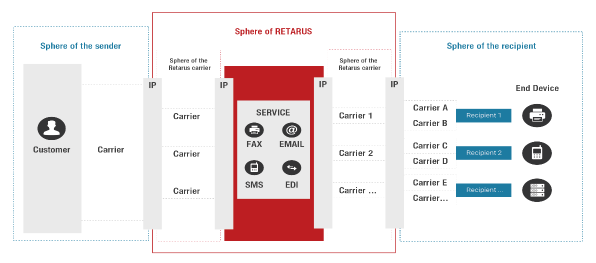
Senders, recipients, or sub-carriers may have transmission quality levels that are inferior to Retarus’ directly contracted carriers and could have an impact on trouble-free interaction. Whilst Retarus always aims to use industry-leading carriers and obtain the best available quality, at some point all traffic has to be handed over to other carriers. Our powers to influence this carrier interconnect, often referred to as the “last mile,” and the quality of these transmission steps are rather limited.
Issues with carriers not under direct contract with Retarus cannot be deemed to originate from Retarus’ sphere of influence. Therefore, Retarus cannot be held responsible for the successful receipt or delivery of messages outside the Retarus system. This also applies to technical infrastructure or devices operated by customers or third-party providers, since these components are neither owned nor controlled by Retarus.
The following illustration briefly outlines the involvement of the various parties.
Country-specific features and restrictions
Some countries and third parties involved in delivering messages may have additional technical and/or legal restrictions that affect delivery rates. Depending on the specific business case, it may be necessary to involve one of Retarus’ Technical Consultants (see Roles on Retarus side).
Support charges
Please note that after a ticket has been closed, certain efforts will be invoiced, including:
-
Tickets opened by the customer regarding malfunctions that were not caused by Retarus or do not originate from Retarus’ sphere of responsibility.
-
Any requests not covered by your contract with us or which go beyond the agreed terms of service.
-
Any special requests (e.g. research and analysis of single fax transmission by the Support team).
-
Any service requests/changes which can be performed without the involvement of Retarus’ support services, e.g., by using the options provided by the Retarus EAS portal.
Only the chargeable support efforts will appear on your Retarus service invoice:
|
Category |
Description |
Chargeable |
|---|---|---|
|
Fax Blacklist Requests |
Adding phone numbers to the blacklist at the owner’s request |
No |
|
Incident at Retarus |
Service degradation due to an issue inside of Retarus’ sphere of influence |
|
|
Virus Complaint - Justified |
Reports of malware |
|
|
Customer Change |
Requests for changes to the configuration of a service |
Yes |
|
Customer EAS /
|
Questions regarding the EAS portal or the details of a service |
|
|
Incident at Customer /
|
Service degradation due to an issue outside of Retarus’ sphere of influence |
|
|
Report Request |
Customer requests a report |
|
|
Research / Analysis |
Requested information or research on a service / EAS reporting |
|
|
Spam Request |
Requested manual analysis of spam messages and rule changes |
|
|
Virus Complaint - Unjustified |
Report of malware, but message(s) not infected. |
Advanced Support
In addition to regular support, which you can contact as described in Contacting Retarus Support, Retarus offers advanced support options.
Service management
Retarus Service Management offers you the option of booking enhanced monitoring and supplementary support services for any of your services. This gives you the opportunity to continuously improve the efficiency, quality, and profitability of your business processes with Retarus’ support. Retarus Service Management offers significantly extended support services compared to standard support. Depending on the package, customized reports are delivered by email and discussed.
Furthermore, Service Management provides a direct contact person, who is available to answer all your questions regarding issues such as service tickets or feature requests. Your Retarus Service Manager serves as your single point of contact to ensure support quality through the management of internal and external interfaces. Each Service Manager only supports a limited number of customers. Service Management assists you in identifying the best possible utilization of your Retarus services.
Technical consulting
Our Technical Consultants have been involved in a wide range of projects. They offer in-depth expertise and many years of experience with customers and partners using our services in all kinds of environments and business processes.
No matter whether you need advice on how to use a product more effectively, taking into account your specific circumstances, or an in-depth analysis on how different services can interact within the framework of your company’s business processes, Retarus’ Technical Consultants create practical added value.
If you are interested in a consultation, please contact your respective Sales Representative.
Support training
Should new colleagues or your third-party contractors require training regarding Retarus’ services, the EAS
portal or our support processes, please contact your local Sales Representative.
Support packages
Support packages assist you in planning your support expenditure upfront, making it easier for you to budget accurately. For more information, please contact your local Sales Representative.
Service issues / scheduled maintenance
Retarus provides a status platform to notify customers of scheduled maintenance and large-scale service issues. Go to Retarus status page to subscribe and manage your notification settings based on service type and data center location. Push notifications are available via email or SMS.
Frequently Asked Questions
Based on our experience, this section provides detailed answers to the most frequently asked questions.
How to open a support ticket via the EAS portal
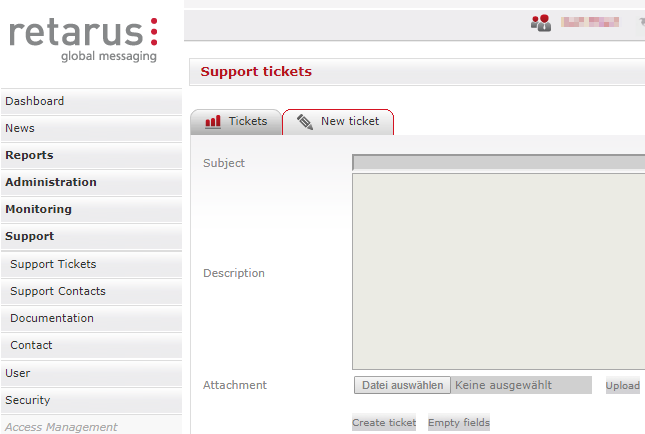
To open tickets via the EAS portal, users need to be authorized support contacts (see Roles on the customer side). If that is the case, you can access the ticket form via the EAS portal and the menu on the left (Support - Support Tickets - New ticket). Please add your subject and a description of your issue. You can add attachments using the Upload button prior to creating the ticket.
How to check the current status of a ticket via the EAS portal
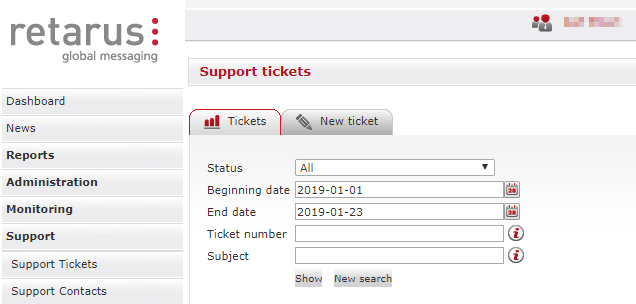
The status of your ticket can be accessed via the EAS portal and the menu on the left (Support - Support Tickets). The Support Tickets view offers filters to search for one or more tickets and to display customer number, ticket number, ticket subject, creation date/time, and status. You can search for tickets with any status or a specific status, e.g., New, Open, Successfully closed, Pending reminder, or Removed. Additional ticket details are displayed in the “Details overview,” e.g. your internal point of contact’s name and email address for receiving ticket updates, ticket attachments, a description of your service issue or request for assistance, and ticket status.
The Support Ticket menu also provides options for ticket status statistics and a Help function.
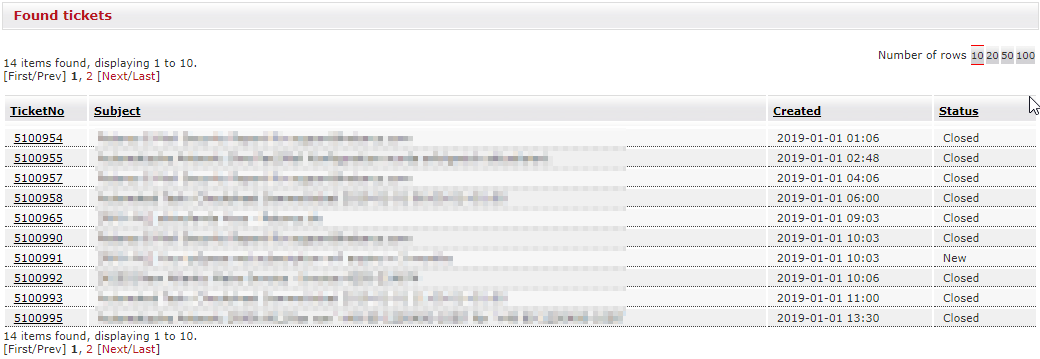
Below is the result of the search described above. You can access the details of a ticket by clicking on the ticket number in the TicketNo column.
Where to find product documentation in the EAS portal
Retarus provides extensive documentation on all its products and processes. You always find the most current version onhttps://docs.retarus.com/eas/product-doc-center
How to manage user and admin accounts for the EAS portal
During the onboarding phase, Retarus will create your initial user accounts for the EAS portal. After that, customers are responsible for managing their EAS portal users themselves.
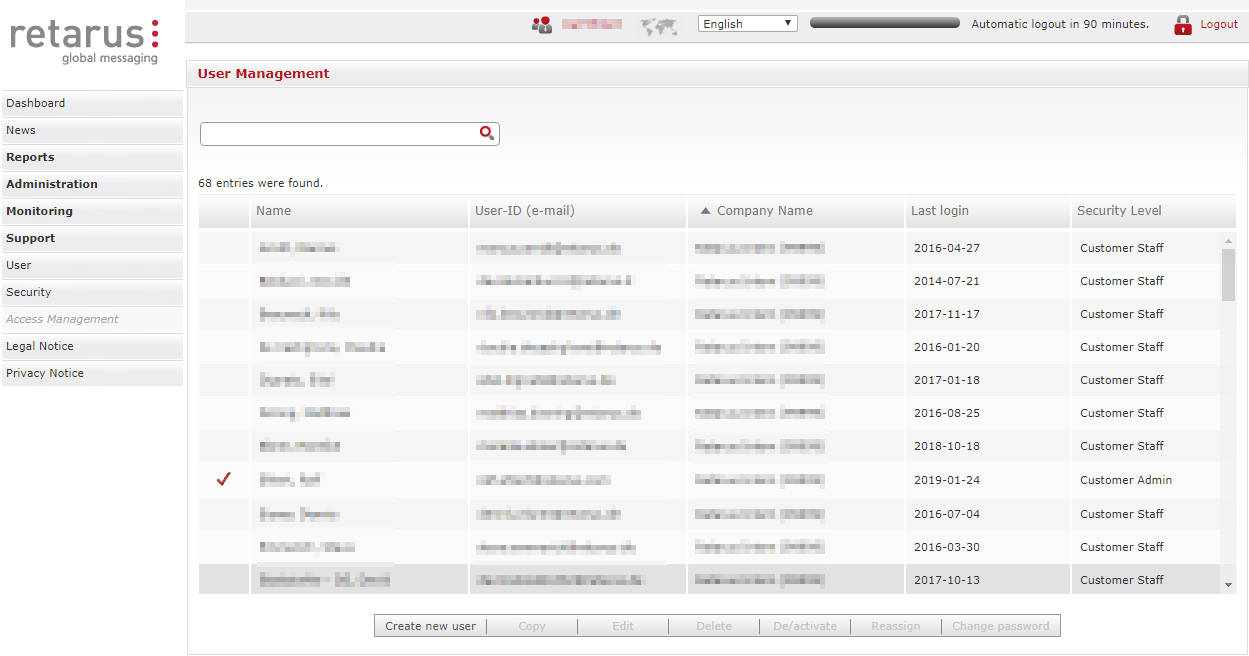
You can access the list of users via the EAS portal and the menu on the left (User). There you can find all active and inactive users, create new users, and edit, delete, deactivate and reactivate users, reassign users to different security levels, and change their passwords. Customers with many users can also search for specific names or email addresses here.
How to reset passwords for EAS accounts
Often, when users have forgotten their passwords, they first try some false passwords and deactivate their account by doing so too many times. Resetting the password will not reactivate the account, though. In this case, the accounts have to be reactivated by an EAS administrator (see also Roles on the customer side).
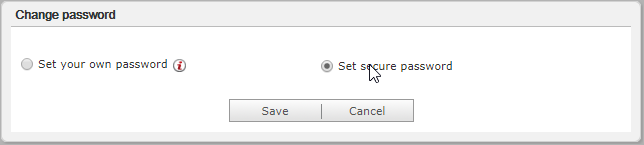
There are two ways to reset the password. An administrator can send a secure password to the user via the user administration (see How to manage user and admin accounts for the EAS portal and the image below).
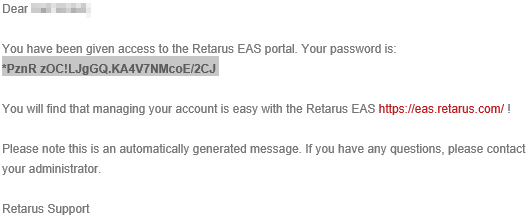
Below, you will find an example of an email containing a secure password. Please be cautious with copy & paste there might be an additional space at the end that is not part of the password.
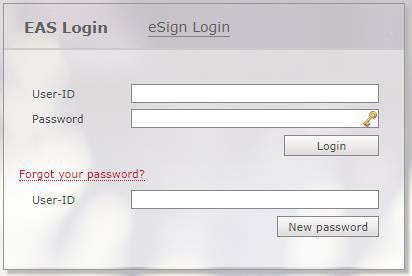
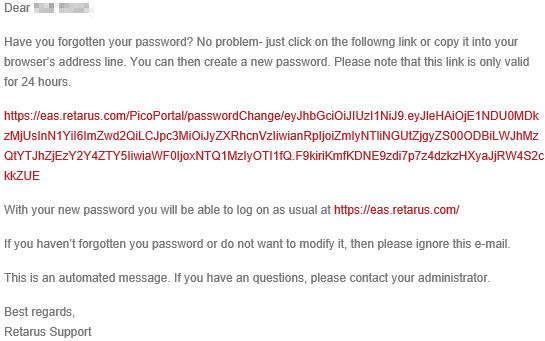
Users can also reset their passwords on their own by requesting an email with a link to reset their password. This email will only be sent to the registered email address of a user.
Below, you will find an example of such an email.
How to maintain the list of authorized support contacts via the EAS portal
Since the authorized support contacts play an essential role in the support process, it is important that this list is always kept up to date.
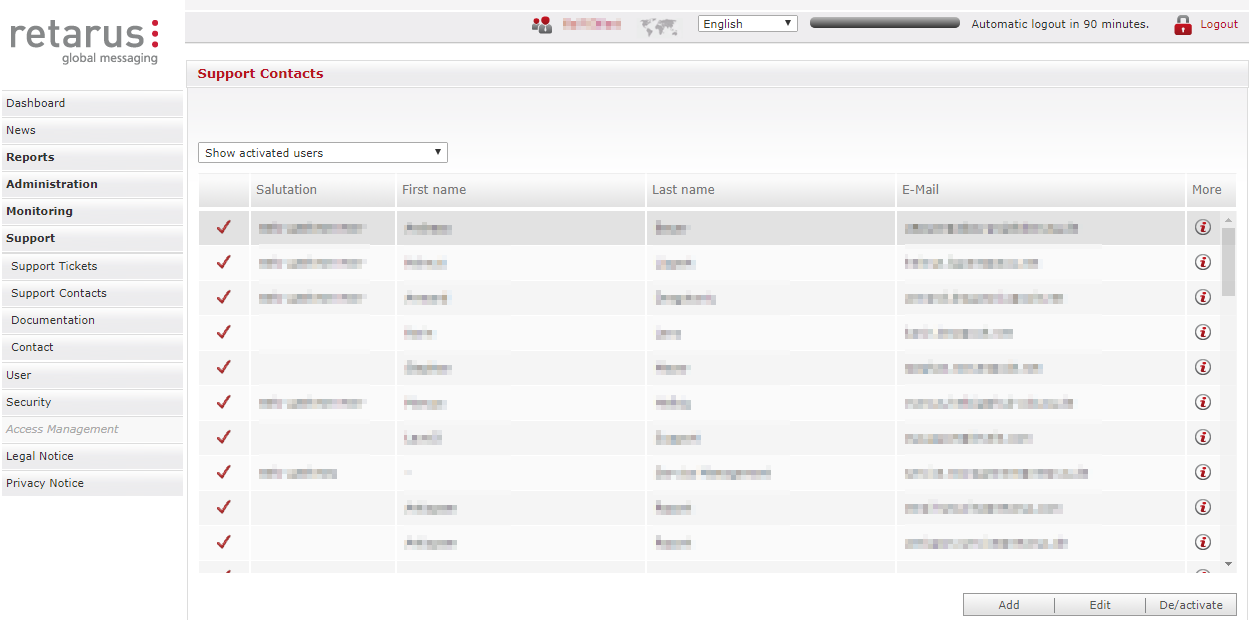
You can access the list of authorized contacts via the EAS portal and the menu on the left (Support - Support Contacts). There you can find all active and inactive contacts, add new contacts, edit, deactivate, and reactivate contacts.
Contact Information
For a detailed list of Retarus office locations, please visit https://www.retarus.com/contact.
Useful links
Retarus Corporate Blog
EAS Portal
Retarus Status Page
Retarus Events
Retarus Newsletter
Retarus Press Releases