
Introduction
Under the Danish Bookkeeping Act (2022), all companies must use digital bookkeeping systems that can send, receive, and store e-invoices.
This law has been phased in:
-
Medium/large companies had to comply from mid-2024 onward.
-
From January 1, 2026, most companies with turnover above DKK 300,000 must support structured e-invoices via certified systems.
-
Full compliance for small companies and in-house systems continues into 2026.
Denmark supports two main structured formats:
-
Peppol BIS Billing 3.0 — aligned with EU-wide standard EN 16931, great for international interoperability.
-
OIOUBL — Denmark’s local implementation of UBL, tailored to Danish requirements; OIOUBL format is being updated to full EN 16931 compliance (OIOUBL 3.0 planned for May 2026).
Invoices must be transmitted through one of these networks:
-
Peppol — international e-invoicing network, interoperable with NemHandel and useful for cross-border B2B
-
NemHandel — Denmark’s local e-invoicing infrastructure.
Please note: Retarus exclusively supports the transmission of Peppol BIS 3.0 documents via the Peppol network in Denmark! This means that business partners must also support Peppol.
Legal information
Retarus strongly recommends consulting a local tax advisor regarding tax law issues. The information provided here is not guaranteed.
Outbound invoices
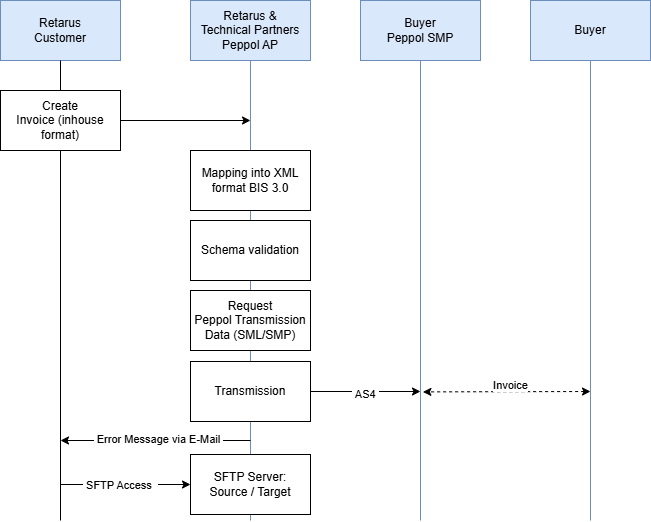
The outbound transfer of invoices is divided into several steps, which are described below.
Step 1 – Creation and transmission
The Retarus customer creates an electronic invoice in their ERP system and sends it to Retarus in an internal (and documented) format (source format). Attachments can be transmitted if this is documented (Base64 encoded). The transmission protocol can be selected from a variety of existing standard protocols (such as tRFC, AS2 or SFTP).
Step 2 – Data processing and Peppol transmission
Retarus converts the source format into the required XML target format Peppol BIS 3.0. The resulting XML document is validated in a further step. The currently valid Schematron from Peppol is used for this purpose. If the check fails, the invoice is not sent. A verification report is generated and sent to the customer via email. If the verification is successful, the recipient's Peppol parameters are queried from the SML (central Peppol address book) and then from the recipient's Peppol provider (SMP service) and subsequently transmitted. If the SMP service and/or the recipient's receiving service cannot be reached, another attempt is made to deliver the invoice within a limited period of time. If this is unsuccessful, an error message is sent by email to the customer, who must resend the invoice at a later date.
Step 3 – Archiving process
Once Retarus has successfully transferred an invoice, it transfers the source and target documents to a Retarus SFTP server. The customer is given access to this server and can retrieve these documents for further processing within 30 days before they are automatically deleted.
Incoming invoices
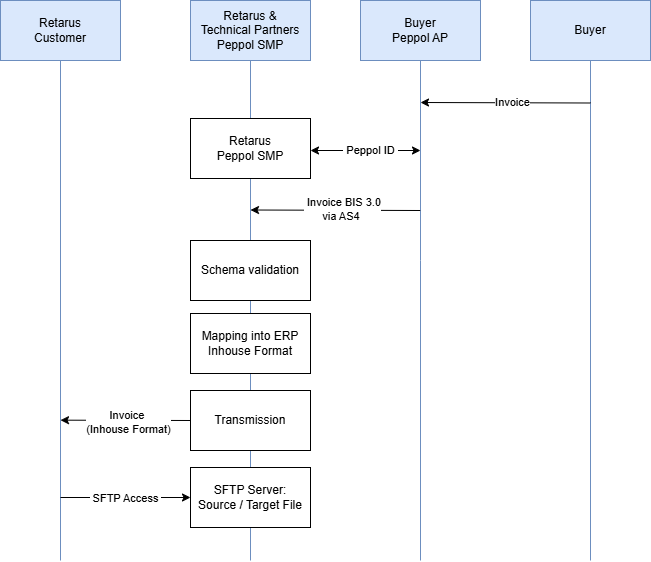
Receiving invoices involves several steps, which are described below.
Step 1: Receive invoices
Retarus provides a certified Peppol SMP service (Service Metadata Provider) for receiving electronic invoices. The service is used to register the customer's Peppol ID in the central Peppol address book (SML) and to provide all communication and format parameters required by the sender via API access. Retarus takes care of registering the Peppol ID.
Step 2: Data processing
Once received, Retarus checks the file using the currently valid Peppol Schematron. If the check fails, the invoice is still processed, if technically possible. An error report is generated and sent to the customer via email. The customer can then decide whether to accept the invoice or not.
Retarus converts the Peppol BIS 3.0 XML invoice into the required in-house format and then transmits the document to the customer's system using the agreed protocol.
Step 3 – Archiving process
Once Retarus has successfully transferred an invoice to the customer's system, Retarus transfers the source and target documents to a Retarus SFTP server. The customer is given access to this server and can retrieve these documents for further processing within 30 days before they are automatically deleted.