
Introduction
Phase 2 of Saudi Arabia’s e‑invoicing program is called “The Integration Phase.” It builds on Phase 1 (Generation Phase) and introduces stronger technical and compliance requirements for businesses.
Here’s the quick, clean breakdown:
What Phase 2 Requires
-
Integration with ZATCA systems
Businesses must connect their invoicing solutions directly to ZATCA’s Fatoora platform through APIs (Service Provider) -
XML (UBL-based) Invoice Format
Invoices must follow a structured XML standard; PDFs can still be shared with customers, but the XML is the official version. -
Cryptographic Stamps & UUIDs
Every invoice needs:-
A UUID (unique universal identifier)
-
A cryptographic stamp generated by ZATCA-approved secure devices
-
Hashing for invoice chaining (helps prevent tampering)
-
-
QR Code Requirement (for B2C)
Simplified tax invoices must include an enhanced QR code containing encoded invoice data.
ZATCA Educational Library: https://zatca.gov.sa/en/E-Invoicing/Introduction/Guidelines/Pages/default.aspx
Legal information
Retarus strongly recommends consulting a local tax advisor regarding tax law issues. The information provided here is not guaranteed.
Outbound invoices
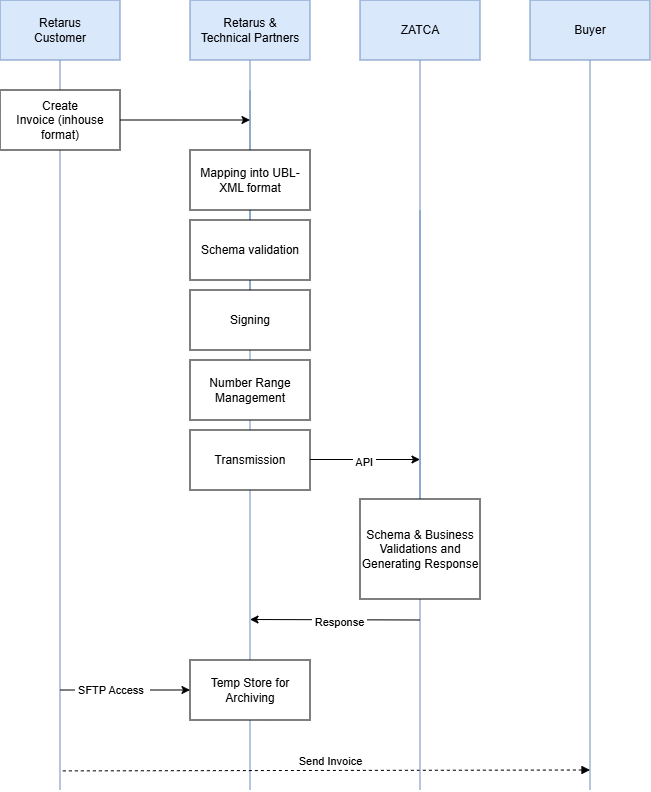
The outbound transfer of invoices is divided into several steps, which are described below.
Step 1 - Creation and transmission
The Retarus customer creates an electronic invoice in their ERP system and sends it to Retarus in an internal (and documented) format (source format). Attachments can be transmitted if this is documented (Base64 encoded). The transmission protocol can be selected from a variety of existing standard protocols (such as tRFC, AS2 or SFTP).
Step 2: Mapping / Signing / Transmission
Upon receiving the electronic invoice, Retarus maps the file into the required UBL-XML format. After, Retarus signs the XML and ensures that the invoices are processed in order for each respective branch/unit, so each invoice gets assigned a number that is next in line, and additionally the hash of the previous invoice (creating a hash chain). Therefore, each invoice gets assigned an ICV (Invoice Counter Value), a PIH (Previous Invoice Hash), and a hash of the current invoice.
Step 3: ZATCA Validation & Receiving Response
The tax authority performs a schema validation and several business validations. An approval or rejection response message is then generated along with an error message, where applicable. The tax authority can also approve documents with warnings, which are included in the approval message.
If the document is a B2B or a B2G document, the tax authority signs it, overwriting the supplier's signature in B2B invoices. B2C invoices retain the supplier's signature.
The tax authority sends a response to Retarus for the transmitted document.
Step 4: Data provision for archives and transmission to business partners
Retarus then transfers the source and the documents received from ZATCO to a Retarus SFTP server. The customer is given access to this server and can retrieve these documents for further processing within 30 days before they are automatically deleted. The invoice must be transmitted through the customers infrastructure and process to the recipient (e.g. by email).
Inbound invoices
Step 1: Retrieve invoices
The customer provides an email inbox solely for incoming invoices. Emails received with UBL XML data attached must be forwarded to a Retarus email inbox.
Step 2: Data processing
Retarus extracts the XML attachment, validates the data, and then converts it into the customer-specific format. Finally, the data is transmitted to the customer (using the same transmission channel as for outbound messages).
Step 3: Archive
Retarus then transfers the source and target documents to a Retarus SFTP server. The customer is given access to this server and can retrieve these documents for further processing within 30 days before they are automatically deleted.