
Introduction
The United Arab Emirates (UAE) is fundamentally transforming its tax and business ecosystem by introducing a mandatory Electronic Invoicing System (EIS). Driven by the Ministry of Finance (MoF) and the Federal Tax Authority (FTA), this initiative transitions the country away from traditional paper and PDF invoices toward a fully automated, real-time digital reporting structure.
https://u.ae/en/information-and-services/business/important-digital-services/digital-invoicing
The "5-Corner" Model and Technology Standard
-
The Infrastructure: The system relies on the international Peppol network.
-
The Format: Invoices must be generated in a specific, highly structured XML format known as PINT AE (the UAE Data Dictionary built on the Peppol International specification).
-
The Process: Businesses cannot send invoices directly to one another. Instead, both the seller and the buyer must route transactions through a network of Ministry-approved Accredited Service Providers (ASPs). When an invoice is sent, the supplier’s ASP automatically validates the data and reports it to the Federal Tax Authority in near real-time before it reaches the buyer.
Phased Implementation Timeline
The mandate applies broadly to entities conducting business in the UAE—regardless of whether they are VAT-registered—using a Tax Identification Number (TIN). Business-to-Consumer (B2C) transactions are currently excluded.
The rollout is structured in phased cohorts:
|
Phase |
Target Group |
Deadline to Appoint an ASP |
Mandatory Go-Live Date |
|
Pilot Phase |
Selected Taxpayer Working Group & Voluntary Adopters |
N/A |
July 1, 2026 |
|
Phase 1 |
Large Businesses (Annual Revenue >= AED 50 Million) |
October 30, 2026 |
January 1, 2027 |
|
Phase 2 |
Smaller Businesses (Annual Revenue < AED 50 Million) |
March 31, 2027 |
July 1, 2027 |
|
Phase 3 |
Government Entities (B2G Transactions) |
March 31, 2027 |
October 1, 2027 |
Other requirements:
Data Fields: Standard electronic tax invoices require a strict semantic model featuring up to 51 mandatory data fields, including precise tax breakdowns, currency equivalents in AED, and transaction flags.
Data Storage: E-invoices must be stored securely for a minimum of 7 years (15 years for real estate). Offshore or cloud hosting is permitted, provided the data remains fully retrievable by the FTA.
Legal information
Retarus strongly recommends consulting a local tax advisor regarding tax law issues. The information provided here is not guaranteed.
Outbound invoices
The outbound transfer of invoices is divided into several steps, which are described below.
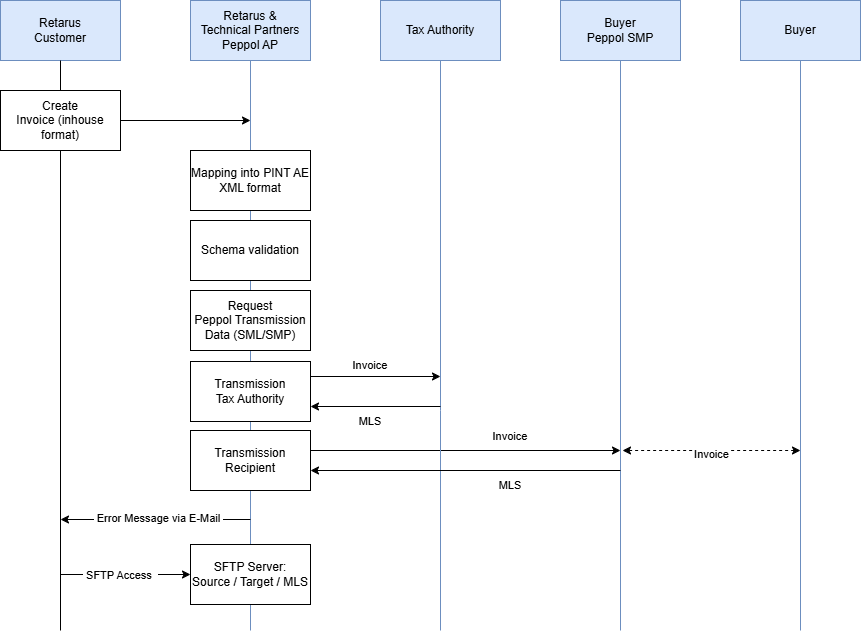
Step 1 – Creation and transmission
The Retarus customer creates an electronic invoice in their ERP system and sends it to Retarus in an internal (and documented) format (source format). Attachments can be transmitted if this is documented (Base64 encoded). The transmission protocol can be selected from a variety of existing standard protocols (such as tRFC, AS2 or SFTP).
Step 2 – Data processing and Peppol transmission
Retarus converts the source format into the required XML target format Peppol PINT AE. The resulting XML document is validated in a further step. The currently valid Schematron from Peppol is used for this purpose. If the check fails, the invoice is not sent. A verification report is generated and sent to the customer via email.
If the verification is successful, the invoice data (TDD) is transmitted to the tax authorities. We then receive what is known as a Message Level Status (MLS) message. In parallel, the receiving service provider is identified via the Peppol directory service and the invoice is transmitted. The receiving Peppol service provider checks the document again and also sends back an MLS. If any of the MLS messages are negative, the customer is notified by email.
Optionally, a system status message can also be sent to the customer’s system.
Step 3 – Archiving process
Once Retarus has successfully transferred an invoice, it transfers the source and target documents and the final MLS to a Retarus SFTP server. The customer is given access to this server and can retrieve these documents for further processing within 30 days before they are automatically deleted.
Incoming invoices
Receiving invoices involves several steps, which are described below.
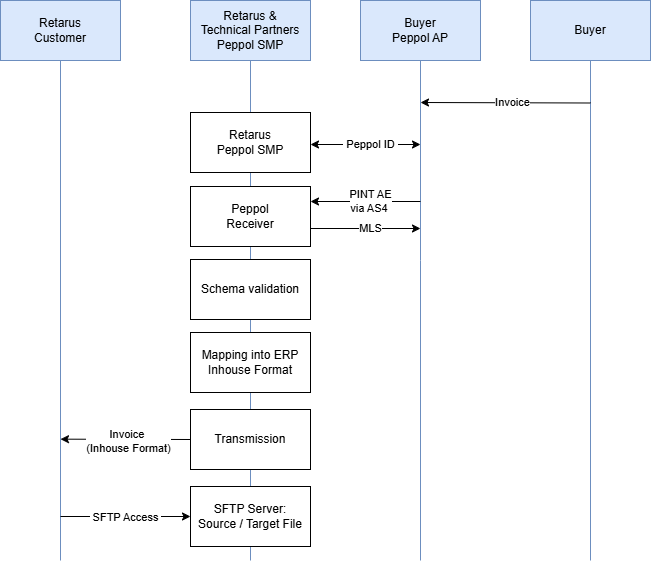
Step 1: Receive invoices
Retarus provides a certified Peppol SMP service (Service Metadata Provider) for receiving electronic invoices. The service is used to register the customer's Peppol ID in the central Peppol address book (SML) and to provide all communication and format parameters required by the sender via API access. Retarus takes care of registering the Peppol ID.
Step 2: Data processing
Once received, Retarus checks the file using the currently valid Peppol Schematron. An MLS is generated based on the verification against the official Schematron. In the event of an error, the invoice is NOT processed further. An error report is generated and sent to the customer by email.
Retarus converts the Peppol PINT AE XML invoice into the required in-house format and then transmits the document to the customer's system using the agreed protocol.
Step 3 – Archiving process
Once Retarus has successfully transferred an invoice to the customer's system, Retarus transfers the source and target documents to a Retarus SFTP server. The customer is given access to this server and can retrieve these documents for further processing within 30 days before they are automatically deleted.