
Architecture
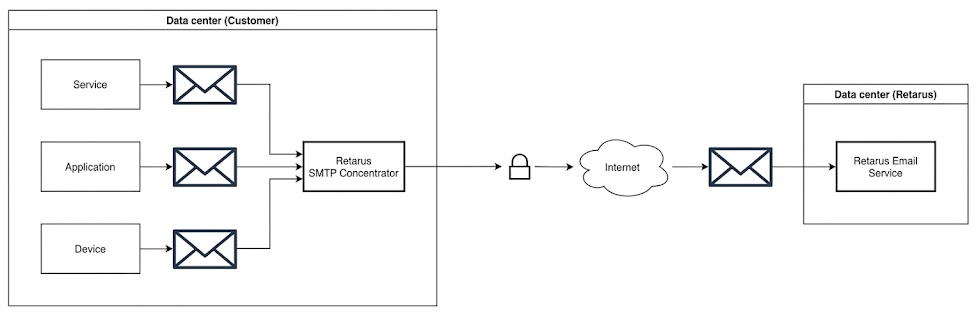
Diagram
-
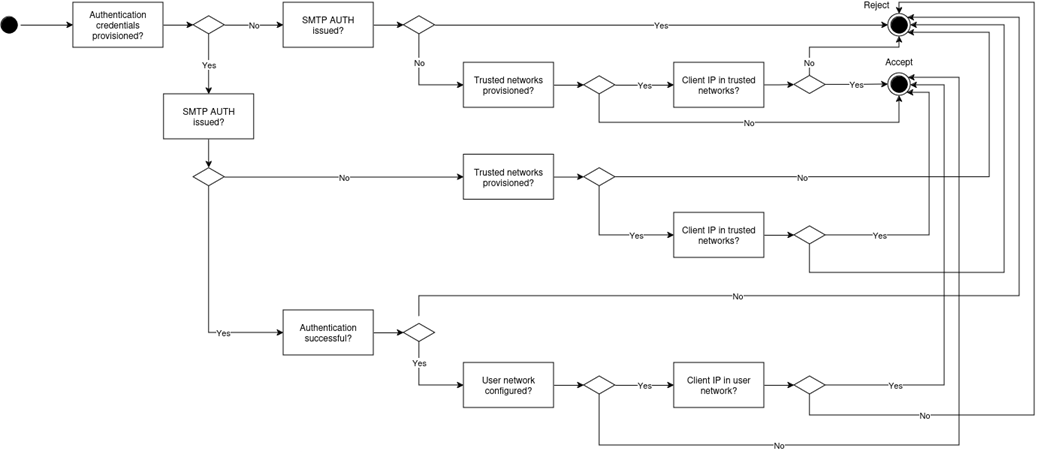
Authentication: Supports username/password or IP-based authentication, which is configurable by the customer.
-
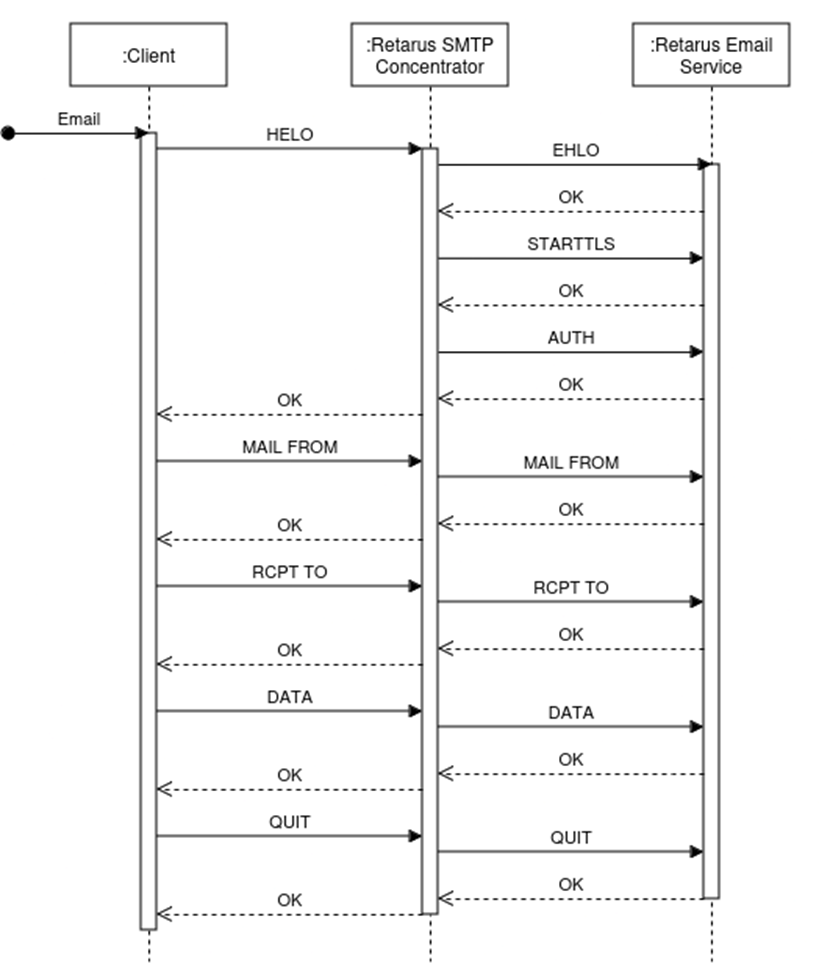
Secure Communication with Retarus: Ensures TLS-encrypted SMTP sessions to Retarus Transactional Email Service API over port 25 or 587, using the App's credentials for authentication.
Session sequence diagram
The App then streams the data to the Retarus Transactional Email Services API. No data is written to disk through processing (as outlined below).
Authentication process within the App
The App is provided via the docker technology. In addition, the customer system is required to host two (CSV, JSON, YAML) files.
Supported authentication methods in the App:
-
Credentials
-
IP or IP range allowlist
-
Any combination of the above
Prerequisites / system requirements
To start the container, the system must meet the following requirements:
-
dockerinstalled in version>= 20.10(see How to install Docker) -
docker-composeinstalled in version>= 1.27.4(see How to install Docker Compose)
Hardware requirements
|
Resource |
Minimum |
Recommended |
|---|---|---|
|
Storage |
5 Gb |
20 Gb |
|
CPU |
2 |
4 |
|
RAM |
4 Gb |
6 Gb |
Mail flow throughput
During tests, a throughput of up to 15.000 emails per minute was achieved. However, actual performance may vary depending on system performance, network latency, and rate limits configured on the Retarus API.
Load Balancer
For enhanced resilience, high availability, and even load distribution, it is recommended to deploy a load balancer in front of the Docker containers.
Authentication CSV files
The two required files can be provided in CSV, JSON or YAML format. They can be stored by the customer either locally on their server or centrally in an S3 store, as long as the App has proper access to these files. Storing the files locally provides proximity to the App, while using an S3 store provides centralized management and accessibility across different environments for customer. In either case, it is essential to ensure that the App can reliably read and interact with these files to maintain proper authentication and functionality.
Command-line interface
The application provides the start and password subcommands.
Start
Starts the application.
$ docker run -it smtp-concentrator:1.0.0 start -help
Usage of start:
  -configFile string
        YAML or JSON configuration file (default "./config.yaml")
Password hash generation
Compatible passwords can be directly generated using the Docker container.
$ docker run -it smtp-concentrator:1.0.0 password -help
Usage of password:
  -hashFunction string
        bcrypt, sha256, sha384 or sha512 (default "bcrypt")
Generating password hash
$ docker run -it smtp-concentrator:1.0.0 password
Enter your password:
Re-enter password:
This is your password hash:

bcrypt:$2a$10$zMEtiQwuotPCpxVkDPf.Je.2k6xlSHe.bKKH/WHOS8E9YngNbHpcO
Configuration
Format
The configuration can be provided in YAML or JSON format. By default, the App reads the config.yaml file from the working directory.
$ smtp-concentrator --help
App usage:
  -config string
     YAML or JSON configuration file (default "./config.yaml")
Properties
The configuration comprises three parts for the modules server, client, and logging. Unless otherwise stated, all properties are required.
Server
server:
  hostname: smtp-concentrator.local
  interface: 0.0.0.0
  port: 2525
  enableProxyProtocol: true
  authenticationCredentials: &authenticationCredentials
  allowInsecureAuthentication: true
  allowInsecurePasswords: false
  trustedNetworks: &trustedNetworks
  tlsCertificate: ./certificate.pem
  tlsKey: ./certificate.key
  requireTls: false
hostname
The name with which the server announces itself via the SMTP protocol. Must be a valid internet hostname (RFC 1123). This property is optional and defaults to localhost.
interface
Network interface of the listener. Must be a valid IPv4 address (RFC 2673).
port
Network port of the listener. Must be a valid TCP port between 1 and 65535.
enableProxyProtocol
Enables the support for the PROXY protocol. This is necessary if the App is running behind a proxy, and the IP addresses of the clients must be preserved for network-based authentication. The IP address of the connection is used if no PROXY header is provided. Therefore, it is safe to enable the PROXY protocol by default. This property is optional and defaults to false.
authenticationCredentials
List of authentication credentials. File can be provided in CSV, JSON or YAML format. See Provisioning for details. This property is optional, and if it is omitted, SMTP AUTH will be disabled.
Authentication credential properties:
-
username
-
password
-
network (optional)
-
costCenter (optional)
-
allowedSenders (optional)
-
forcedSender (optional)
Property Explanation
-
network: when this is non-empty, only accept mails with authentication from that network
-
allowedSenders: when this is non-empty, only accept mails with authentication from these senders. A maximum of 50 entries is supported per entry; if this limit is exceeded, the entire entry is not applied.
-
forcedSender: when this is non-empty, the sender of an accepted mail is overwritten with this value. The value can either be a plain address (e.g.
forced.sender@example.test) or an address with a display name (e.g.Forced Sender <forced.sender@example.test>); both must be valid according to RFC 5322. The plain address is always used to overwrite the envelope sender. If a display name is provided, the full value (display name and address) is used to overwrite the MIMEFromheader; otherwise the plain address is used for both. If validation fails, the entire entry is not applied.
Password formats
[PLAIN_TEXT_PASSWORD]
bcrypt:[BCRYPT_PASSWORD_HASH]
sha256:[SALT]:[SHA256_PASSWORD_HASH]
sha384:[SALT]:[SHA384_PASSWORD_HASH]
sha512:[SALT]:[SHA512_PASSWORD_HASH]
CSV example
"User A","user1","password1",""
"User B","user2","password2","192.168.0.1"
"User C","user3","password3","10.0.0.0/16"
"User D
(bcrypt)","user4","bcrypt:$2a$10$gon.0wTZMTt9R88kf.N4duEEBPV.EcPAj6x4jL7toU/rS
073CMeQS",""
"User E
(SHA256)","user5","sha256:62e9ce27f1b752b14fd31aef6a810654:2f8377f47d4bfa18632c
89187418e87d1fac662083111c0931a2dd19dcd3c802",""
"User F
(SHA384)","user6","sha384:39e698f2f65833d4a967bf444b8e13bb:5d310a4c9a4911ad001a
c2864ec27cb41f19415a10e3e857365d9c1378b3b88c08db62524253dac9d65e93eff90cc59a",
""
"User G
(SHA512)","user7","sha512:665d90de055076aa2383a79a52aae1e6:d52482f9f92155152e3a
1b97c08631661485a70b385f6bbf9d83a31420e7fe8bffb76c2fce59d51d306bb03f84e1cb7eb79
86ae8ed0b8df97 fa77d91f855530b","192.168.0.0/24"
JSON example
[
  {
    "username": "user1",
    "password": "password1",
    "costCenter": "COST1",
    "allowedSenders": ["allowed.sender1@example.test"],
    "forcedSender": "forced.sender@example.test"
  },
  {
    "username": "user2",
    "password": "password2",
    "network": "192.168.0.1",
    "allowedSenders": [
      "allowed.sender2@example.test",
      "allowed.sender3@example.test"
    ]
  },
  {
    "username": "user3",
    "password": "password3",
    "network": "10.0.0.0/16",
    "allowedSenders": ["\"quoted,localpart\"@example.test"]
  },
  {
    "username": "user4",
    "password": "bcrypt:$2a$10$gon.0wTZMTt9R88kf.N4duEEBPV.EcPAj6x4jL7toU/rS073CMeQS"
  },
  {
    "username": "user5",
    "password": "sha256:62e9ce27f1b752b14fd31aef6a810654:2f8377f47d4bfa18632c89187418e87d1fac662083111c0931a2dd19dcd3c802"
  },
  {
    "username": "user6",
    "password": "sha384:39e698f2f65833d4a967bf444b8e13bb:5d310a4c9a4911ad001ac2864ec27cb41f19415a10e3e857365d9c1378b3b88c08db62524253dac9d65e93eff90cc59a"
  },
  {
    "username": "user7",
    "password": "sha512:665d90de055076aa2383a79a52aae1e6:d52482f9f92155152e3a1b97c08631661485a70b385f6bbf9d83a31420e7fe8bffb76c2fce59d51d306bb03f84e1cb7eb7986ae8ed0b8df97fa77d91f855530b",
    "network": "192.168.0.0/24"
  }
]
YAML example
- username: user1
  password: password1
  costCenter: COST1
  allowedSenders:
    - allowed.sender1@example.test
  forcedSender: forced.sender@example.test

- username: user2
  password: password2
  network: 192.168.0.1
  allowedSenders:
      - allowed.sender2@example.test
      - allowed.sender3@example.test

- username: user3
  password: password3
  network: 10.0.0.0/16
  allowedSenders:
      - '"quoted,localpart"@example.test'

- username: user4
  password: bcrypt:$2a$10$gon.0wTZMTt9R88kf.N4duEEBPV.EcPAj6x4jL7toU/rS073CMeQS

- username: user5
  password: sha256:62e9ce27f1b752b14fd31aef6a810654:2f8377f47d4bfa18632c89187418e87d1fac662083111c0931a2dd19dcd3c802

- username: user6
  password: sha384:39e698f2f65833d4a967bf444b8e13bb:5d310a4c9a4911ad001ac2864ec27cb41f19415a10e3e857365d9c1378b3b88c08db62524253dac9d65e93eff90cc59a

- username: user7
  password: sha512:665d90de055076aa2383a79a52aae1e6:d52482f9f92155152e3a1b97c08631661485a70b385f6bbf9d83a31420e7fe8bffb76c2fce59d51d306bb03f84e1cb7eb7986ae8ed0b8df97fa77d91f855530b
  network: 192.168.0.0/24
allowInsecureAuthentication
If enabled, SMTP AUTH is allowed for insecure sessions. Otherwise, the SMTP AUTH command will be rejected if STARTTLS has not been issued. This property is optional, defaults to false, and has no effect if no authentication credentials provisioning is configured.
allowInsecurePasswords
If enabled, plain text passwords are allowed. Otherwise, the SMTP AUTH command will be rejected for this user. This property is optional, defaults to false, and has no effect if no authentication credentials provisioning is configured.
trustedNetworks
List of trusted networks for which no authentication is required. Requires value for network. See Provisioning for details. This property is optional.
Example provisioning file
"Network 1","127.0.1.1"
"Network 2","127.0.0.0/24"
"Network 3","192.168.0.1"
tlsCertificate
File system path of the TLS certificate for the server.
tlsKey
File system path of the TLS certificate key for the server.
requireTls
If enabled, STARTTLS is always required for SMTP sessions. Otherwise, SMTP commands after HELO will be rejected. This property is optional and defaults to false.
Provisioning
provisioning:
  name: name
  resource: &resource
  authentication: &authentication
  format: &format
  interval: 10m
name
Name of the provisioning. Will be used for logging.
resource
type: HTTP
location: https://example.com/config/provisioning.csv
timeout: 60s
skipCertificateVerification: false
Supported types are FILE and HTTP. The location must be a file system path for the FILE type or a URL for the HTTP type. The timeout property defaults to 60s, and the skipCertificateVerification property defaults to false. Both properties are optional and are only supported for HTTP resources.
authentication
type: BASIC
credentials:
  username: username
  password: password
Supported types are BASIC and AWS for S3. The credentials must be username and password for type BASIC and key and secret for type AWS. The authentication is ignored for FILE resources.
format
type: CSV
noHeader: false
columns:
  username: 0
  password: 1
  network: 2
The supported type is CSV. The noHeader property is optional and defaults to false. If set, the first line of the file will be skipped. The required columns depend on the use case. The index of the columns must be between 0 and 32, with index 0 being the first column. All other columns will be ignored.
interval
The interval at which the App checks for a new configuration. This property is optional, and if omitted, the configuration will be provisioned once at the start.
Client
client:
  server: mail.example.com
  port: 25
  skipCertificateVerification: false
  username: username
  password: password
  commandTimeout: 10s
  submissionTimeout: 60s
  noReferenceHeader: false
server
Domain name of the Retarus Transactional Email Services API. Must be a valid internet hostname (RFC 1123).
port
Network port of the Retarus Transactional Email Services API. Must be either 25 or 587.
skipCertificateVerification
Disables the server certificate verification.
username
Username for the authentication of the Retarus Transactional Email Services API.
password
Password for the authentication of the Retarus Transactional Email Services API.
commandTimeout
Timeout for SMTP commands sent to the Retarus Transactional Email Services API.
submissionTimeout
Timeout for the email sent to the Retarus Transactional Email Services API.
noReferenceHeader
The property is optional and defaults to false. If set to true, no header will be added with the reference. Emails are not traceable if the reference header is omitted.
Monitoring
The monitoring configuration is optional. If omitted, the HTTP resources are not available.
monitoring:
  interface: 0.0.0.0
  port: 8080
  enableTls: false
  tlsCertificate: ./certificate.pem
  tlsKey: ./certificate.key
  enableHealth: true
  enableMetrics: true
  enableDashboard: true
  dashboardUser: example_user
  dashboardPassword: secret
interface
Network interface of the HTTP server. Must be a valid IPv4 address (RFC 2673).
port
Network port of the HTTP server. Must be a valid TCP port between 1 and 65535.
enableTls
This property is optional and defaults to false. If enabled, HTTPS is used for the listener. When set to true, tlsCertificate and tlsKey are required.
tlsCertificate
File system path of the TLS certificate for the HTTP server. This property is optional and only required when enableTls is true.
tlsKey
File system path of the TLS certificate key for the HTTP server. This property is optional and only required when enableTls is true.
enableHealth
This property is optional and defaults to false. If enabled, a health check endpoint is available under the path /health.
enableMetrics
This property is optional and defaults to false. If enabled, Prometheus metrics are available under the path /metrics.
enableDashboard
This property is optional and defaults to false. If enabled, the interactive dashboard is available in the browser.
dashboardUser
This property is optional and sets the username for HTTP Basic Authentication on the dashboard. It only takes effect when dashboardPassword is set. Defaults to admin.
dashboardPassword
This property is optional. If set and non-empty, HTTP Basic Authentication is required for the dashboard using the configured username and password.
Logging
logging:
  level: DEBUG
level
Minimum log level for printed log messages. The following values can be configured:
-
TRACE
-
DEBUG
-
INFO
-
WARN
-
ERROR
-
FATAL
-
PANIC
Examples
Open relay configuration
server:
  interface: 0.0.0.0
  port: 25
  tlsCertificate: ./certificate.pem
  tlsKey: ./certificate.key

client:
  server: mail.example.com
  port: 587
  username: username
  password: password
  commandTimeout: 10s
  submissionTimeout: 60s

logging:
  level: INFO
Configuration with file and S3 provisioning
server:
  hostname: smtp-concentrator.local
  interface: 0.0.0.0
  port: 2525
  enableProxyProtocol: true
  authenticationCredentials:
    name: authentication-credentials-provisioning
    resource:
      type: FILE
      location: ./config/auth.csv
    format:
      type: CSV
      columns:
        username: 0
        password: 1
        network: 2
        costCenter: 3
        allowedSenders: 4
        forcedSender: 5
    interval: 5m
  allowInsecureAuthentication: true
  trustedNetworks:
    name: trusted-networks-provisioning
    resource:
      type: HTTP
      location: https://example.com/config/network.csv
      timeout: 60s
      skipCertificateVerification: true
    authentication:
      type: AWS
      credentials:
        key: key
        secret: secret
    format:
      type: CSV
      columns:
        network: 0
        costCenter: 1
        allowedSenders: 2
        forcedSender: 3
    interval: 10m
  tlsCertificate: ./certificate.pem
  tlsKey: ./certificate.key
  requireTls: false

client:
  server: mail.example.com
  port: 587
  skipCertificateVerification: false
  username: username
  password: password
  commandTimeout: 10s
  submissionTimeout: 60s

logging:
  level: DEBUG
Application setup
Docker image import
The Docker image can be imported from the TAR archive provided by Retarus (see Docker CLI reference):
docker load < ./smtp-concentrator_1.0.0.tar
The Docker image import can be verified by listing local images with the smtp-concentrator tag:
$ docker image ls smtp-concentrator
REPOSITORY          TAG     IMAGE ID      CREATED             SIZE
smtp-concentrator   1.0.0   c3112ee34de7  About a minute ago  11.8MB
Docker Compose setup
Docker Compose file
Example of docker-compose.yml (see Docker Compose quickstart)
The working directory is /app/ and referenced files must have an absolute path or a relative path to the working directory.
services:
  smtp-concentrator:
    # Docker image name and version
    image: smtp-concentrator:1.0.0
    volumes:
      # Mount of the local configuration into the container
      - ./config.yaml:/app/config.yaml
      # Mount of the local server certificate into the container (must be referenced in the configuration)
      - ./certificate.pem:/app/certificate.pem
      # Mount of the local server certificate key into the container (must be referenced in the configuration)
      - ./certificate.key:/app/certificate.key
      # Mount of a provisioning configuration (must be referenced in the configuration)
      - ./auth.csv:/app/auth.csv
      # Mount of a provisioning configuration (must be referenced in the configuration)
      - ./network.csv:/app/network.csv
      # Optional mounting of local certificate authorities
      - /etc/ssl/certs/:/etc/ssl/certs/
    ports:
      # Port mapping from local listener port to server port (defined in configuration)
      - 2525:2525
    # Automatically restart Docker container
    restart: always
Application start
The Docker Compose setup can be run from the same directory as the docker-compose.yml file.
docker-compose up -d
Application logs
Logs of the running service can be viewed with the following command.
docker-compose logs -f
Debugging
Common log messages
This section describes common log messages that customers might see and explains their meaning.
Message has been successfully forwarded to Retarus
{"level":"INFO","name":"smtp-concentrator",
"sessionId":"cefc7eb7-b5e0-447c-9030-71f17e34ba7f",
"messageId":"2169f076-9f2f-43cd-ba77-34aadd99e991",
"time":"1979-01-01T00:00:00Z",
"method":"session.go:180",
"message":"Successfully forwarded message to mail.example.com:587
(Ok: processed as 4WtxwV5y2Nz1wFX)"}
Network not trusted and authentication not successful
{"level":"INFO",
"name":"smtp-concentrator",
"sessionId":"f1612cdf-76db-4964-baada44772ad6bf7",
"messageId":"17127bbf-429c-4607-ab46-b102984effc6",
"time":"1979-01-01T00:00:00Z",
"method":"session.go:116",
"message":"Rejected unauthenticated connection from 127.0.0.1"}
Invalid client credentials
{"level":"ERROR",
"name":"smtp-concentrator",
"sessionId":"82c99347-a5c3-46b0-8881-7a671cb0debc",
"error":"SMTP error 535: Error: authentication failed: ",
"time":"1979-01-01T00:00:00Z",
"method":"session.go:38","message":"Client authentication failed"}
Invalid configuration
{"level":"FATAL",
"name":"smtp-concentrator",
"error":"jsonschema: '/server' does not validate with file:///schema.json#
/properties/server/required: missing properties: 'interface'",
"time":"1979-01-01T00:00:00Z",
"method":"smtpconcentrator. go:85",
"message":"Failed to parse configuration"}
Performance tests
Results
The table below shows the application's performance. For the load tests we used smtp-source with 1000 byte mails.
|
Clients |
Requests/s |
Cores |
Instances |
|---|---|---|---|
|
150 |
263 |
2 |
1 |
|
100 |
271 |
2 |
1 |
|
10 |
84 |
2 |
1 |
Terms of use
Please refer to Terms of Use.
If you do not fully agree to the Terms of Use, do not install, access, or use the App.