
The Retarus FTP API allows you to send faxes and retrieve delivery reports via file transfer. To send a fax, you submit a fax job. Each fax job consists of two files:
-
The document to send
-
The associated XML job file
Upload both files to the server. After the fax job is processed, the server generates an XML status report for that job so you can track its delivery status.
Default directories
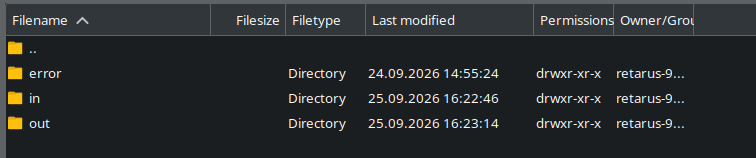
The Retarus FTP server provides the following default directories.
|
Directory |
Description |
|---|---|
|
|
Upload document files and XML job files to this directory. |
|
|
Download XML status reports from this directory. |
|
|
Review files from jobs that could not be processed. |
Retarus can configure additional directories for your account during onboarding.
Available servers
Connect to the server location closest to your infrastructure.
|
Server |
Location |
|---|---|
|
fax4ba.de1.retarus.com |
Frankfurt |
|
fax4ba.de2.retarus.com |
Munich |
|
fax4ba.us1.retarus.com |
Ashburn |
|
fax4ba.us2.retarus.com |
Secaucus |
|
fax4ba.ch1.retarus.com |
Zurich |
|
fax4ba.sg1.retarus.com |
Singapore |
XML job file naming
The XML job file must use the format jobXXXX.xml
Replace XXXX with a unique alphanumeric string of your choice. XXXX is a general placeholder and is not limited to exactly 4 characters. It may be longer.
Follow these naming rules:
-
The filename must be unique and cannot be reused.
-
The prefix
jobmust be lowercase. -
The XML job file and the fax files must always have different names to avoid collisions or accidental overwriting.
-
Fax files must have unique filenames across all job files.
-
The total filename length should stay within the normal range supported by common file systems. As a practical recommendation, keep filenames within 50 characters.
-
For maximum cross-platform compatibility, use only:
-
letters (
a–z,A–Z) -
numbers (
0–9) -
dashes (
-) -
underscores (
_) -
a single dot (
.) for the file extension
-
-
Avoid spaces and special characters to help prevent transfer or processing errors across different operating systems, FTP clients, and web servers.
Examples
-
job1234.xml -
jobA20240918.xml -
job_customer-4711.xml -
job_batch_2024_09_18.xml
Transmission sequence & fax files per job
Transfer files in this order:
-
Transfer all document files referenced by the fax job.
-
Transfer the associated XML job file.
Make sure all referenced document files are fully transferred before you transfer the XML job file.
You can include multiple fax files (<fax-file>) in a single fax job (<fax>) within the fax file list (<fax-file-list>). The files are merged in the order listed.
Rate limiting
By default, Retarus FTP API applies a rate limit of 1000 fax pages per hour per customer account. If you need to adjust or increase this limit, contact Retarus Support.
Failed jobs
When a job fails, its files are placed in the error directory, and ERROR_ is added to the beginning of each file name.
-
Rendering errors
If Retarus cannot convert a document into a fax, the files are not placed in theerrordirectory. You can find the failed fax in myEAS reporting or the GraphQL API Reporting. -
Jobs that cannot be handed over for processing
If a job cannot be handed over for processing at all (for example, due to a connection problem), the fax files remain in theindirectory.
Supported formats
|
Category |
Supported formats |
|---|---|
|
Text |
DOC, DOCX, PDF, TXT, RTF, ODT |
|
Spreadsheet |
XLS, XLSX, ODS |
|
Comma-separated values |
CSV |
|
Presentation |
PPT, PPTX, ODP |
|
Graphic |
JPEG, JPG, GIF, TIFF, TIF, BMP, PNG |
|
HyperText Markup Language |
HTM, HTML |
|
|
PS, PCL |
Important considerations
-
Configured paper size settings, such as the EAS Paper size option, do not apply to PDF documents. Instead, PDF files render using the page size defined in the document itself.
-
HTML documents do not support external links. For security reasons, Retarus does not download external files during rendering. As a result, linked images and other external resources do not appear in the fax. To include an image, embed it directly in the HTML document.
-
If you encounter an unsupported format, contact Retarus Support.
Text file encoding requirements
For text files, specify the encoding using <file-encoding>. If you do not specify an encoding, the system uses ISO 8859-1 by default.
Valid values:
|
Value |
Encoding |
|---|---|
|
88591 |
ISO 8859-1 (Latin 1) |
|
88592 |
ISO 8859-2 (Latin 2) |
Notes
-
Include only one fax job per job file. Use a single
<fax>block in each XML job file. -
Multiple fax addresses are allowed in each fax job’s distribution list by using multiple
<fax-address>blocks within a<distribution-list>block. -
References are optional. If you use them, they must be unique:
-
<reference>must be unique within your system. -
<job-reference>must be unique for each job file. -
<addr-reference>must be unique for each distribution list.
-
-
<billing-code>is optional. -
<fax-options>is optional. You can use all, some, or none of the available options.
Fax options
The following table describes the available fax options:
|
Option |
Description |
|---|---|
|
|
Contains control information such as the transmission date and time, and the fax sender and recipient name. Example
|
|
|
Unique fax ID. |
|
|
Resolution: high or low (default: high). |
|
|
For fax numbers in Germany only.
|
|
|
Express transmission: yes or no (default: no). |
|
|
Transmission time:
|
|
|
Stationery function. Use
The stationery is stored at Retarus in TIFF format. |
Phone number formats
Phone numbers are accepted in the following formats:
-
00498912504001702 -
0049 89 1250400 1702 -
+498912504001702 -
+49/89/1250400-1702 -
0049/89/1250400 1702 -
089/1250400-1702 -
089/12504001702
Standard example
Standard XML job file
<?xml version="1.0" encoding="iso-8859-1"?>
<!DOCTYPE jobs SYSTEM "job.dtd">
<!-- $Id: job.xml,v 1.8 2004/08/19 16:27:15 john Exp $ -->
<jobs>
	<reference>1972307242</reference>
	<fax>
		<job-reference>1972307242-01</job-reference>
		<billing-code>Purchasing</billing-code>
		<fax-file-list>
			<fax-file>
				<file-name>polish.txt</file-name>
				<file-encoding>88592</file-encoding>
			</fax-file>
			<fax-file>
				<file-name>1972307242-01-02.pdf</file-name>
			</fax-file>
		</fax-file-list>
		<fax-options>
			<resolution>high</resolution>
			<csid>+49(0)8102-740178</csid>
			<header>%0f %d.%m.%Y %H:%M:%S %C %P/%T</header>
			<blacklist>no</blacklist>
			<express>yes</express>
			<schedule>now</schedule>
			<overlay>
				<overlay-name>FBA</overlay-name>
				<overlay-mode>first-page</overlay-mode>
			</overlay>
		</fax-options>
		<distribution-list>
			<fax-address>
				<fax-number>089/1250400-1702</fax-number>
				<addr-reference>1972307242-02-01</addr-reference>
			</fax-address>
			<fax-address>
				<fax-number>089/00000000300</fax-number>
				<addr-reference>1972307242-02-02</addr-reference>
			</fax-address>
		</distribution-list>
	</fax>
  </jobs>
Report for the standard job file
<?xml version="1.0" encoding="iso-8859-1"?>
<!DOCTYPE reports SYSTEM "rep.dtd">
<reports>
	<job-ref-id>XR-924c5062-83c9-420f-ab4f-84a46d1e0115-413D801F02BB006524D6</job-ref-id>
	<reference>1972307242</reference>
	<fax>
		<job-id>XF413D801F02BB006674E8</job-id>
		<job-reference>1972307242-01</job-reference>
		<billing-code>Purchasing</billing-code>
		<fax-file-list>
			<fax-file>
				<file-name>polish.txt</file-name>
				<file-encoding>88592</file-encoding>
				<file-status>available</file-status>
			</fax-file>
			<fax-file>
				<file-name>1972307242-01-02.pdf</file-name>
				<file-status>available</file-status>
			</fax-file>
		</fax-file-list>
		<fax-options>
			<resolution>high</resolution>
			<csid>+49(0)8102-740178</csid>
			<header>%0f    %d.%m.%Y %H:%M:%S    %C    %P/%T</header>
			<blacklist>no</blacklist>
			<express>yes</express>
			<schedule>now</schedule>
			<overlay>
				<overlay-name>FBA</overlay-name>
				<overlay-mode>first-page</overlay-mode>
			</overlay>
		</fax-options>
		<distribution-list>
			<fax-address>
				<addr-id>XA413D801F02BB00683C3D</addr-id>
				<fax-number>089/00000000300</fax-number>
				<addr-reference>1972307242-02-02</addr-reference>
				<status>OK</status>
				<remote-csid>08900000000300</remote-csid>
				<duration>0</duration>
				<timestamp>2024-09-07-11.34.18</timestamp>
			</fax-address>
			<fax-address>
				<addr-id>XA413D801F02BB0067C73B</addr-id>
				<fax-number>089/1250400-1702</fax-number>
				<addr-reference>1972307242-02-01</addr-reference>
				<status>OK</status>
				<remote-csid>+49/89/1250400-1702</remote-csid>
				<duration>60</duration>
				<timestamp>2024-09-07-11.35.21</timestamp>
			</fax-address>
		</distribution-list>
	</fax>
</reports>
Minimal example
Minimum XML job file
<?xml version="1.0" encoding="iso-8859-1"?>
<!DOCTYPE jobs SYSTEM "job.dtd">
<jobs>
	<fax>
		<fax-file-list>
			<fax-file>
				<file-name>minimal.pdf</file-name>
			</fax-file>
		</fax-file-list>
		<distribution-list>
			<fax-address>
				<fax-number>089/1250400-1702</fax-number>
			</fax-address>
		</distribution-list>
	</fax>
</jobs>
Report for the minimal job file
<?xml version="1.0" encoding="iso-8859-1"?>
<!DOCTYPE reports SYSTEM "rep.dtd">
<reports>
	<job-ref-id>XR-924c5062-83c9-420f-ab4f-84a46d1e0115-413D7AFE02BB00621883</job-ref-id>
	<fax>
		<job-id>XF413D7AFE02BB00633D84</job-id>
		<fax-file-list>
			<fax-file>
				<file-name>minimal.pdf</file-name>
				<file-status>available</file-status>
			</fax-file>
		</fax-file-list>
		<distribution-list>
			<fax-address>
				<addr-id>XA413D7AFE02BB0064CD2F</addr-id>
				<fax-number>089/1250400-1702</fax-number>
				<status>OK</status>
				<remote-csid>+49/89/1250400-1702</remote-csid>
				<duration>47</duration>
				<timestamp>2024-09-07-11.11.17</timestamp>
			</fax-address>
		</distribution-list>
	</fax>
</reports>
Status codes and reporting
-
For a complete list of fax status codes, see Transmission status codes - Outbound Fax.
-
For information about Fax-for-Applications reporting features, see Reporting in Cloud Fax.
Fax headers
The following table describes the control characters you can use to personalize the fax header.
|
Control character |
Description / usage / parameters |
Example |
|---|---|---|
|
%Y |
Year, zero-padded to 4 digits |
|
|
%y |
Year, zero-padded to 2 digits |
|
|
%m |
Month, zero-padded to 2 digits ( |
|
|
%b |
Abbreviated month name |
|
|
%B |
Full month name |
|
|
%d |
Day of the month, zero-padded to 2 digits ( |
|
|
%a |
Abbreviated day of the week, 3 digits |
|
|
%A |
Full day of the week |
|
|
%H |
Hour, zero-padded to 2 digits ( |
|
|
%M |
Minute, zero-padded to 2 digits ( |
|
|
%S |
Second, zero-padded to 2 digits ( |
|
|
%P |
Page number, zero-padded to 2 digits ( |
|
|
%R |
Page number, zero-padded to 3 digits ( |
|
|
%T |
Total number of pages ( |
|
|
%K |
Personalizes the header using the Reference information field |
|
|
%% |
Inserts a single percent sign ( |
|
|
%I |
Hour in AM/PM format, 2 digits ( |
|
|
%p |
Current time in AM/PM format |
|
|
%# |
Recipient fax number (normalized) |
|
|
%tz=MEST |
Selects a specific time zone |
|
|
%z |
Time zone offset from GMT |
|
|
%Z |
Time zone abbreviation |
|
|
%c |
Center-justifies the following text. Do not use to the right of |
|
|
%r |
Right-justifies the following text. Do not use to the left of |
|
|
%C |
Sender fax ID (CSID) |
|
|
%n |
Inserts a newline character. Multiple newlines are supported, but using more than two is not recommended. |
|
|
%l=<lang> |
Sets the language for date and time output |
|
📌 Standalone percent signs
Standalone percent signs are not allowed.
Examples
%d.%m.%Y %H:%M:%S Page: %P of %T Sender: Sample Inc. – Service Dept.
Header
01.02.2016 18:03:17 Page: 1 of 12 Sender: Sample Inc. – Service Dept.
Sample distribution list
08102740567,Retarus att. Mr. Meier
08102740149, Retarus att. Ms. Schulze
Custom header setting
%d.%m.%Y %H:%M:%S From: Sample GmbH To: %K Page: %P of %T
Header for the first number in the distribution list
01.02.2018 14:03:17 From: Sample GmbH To: Retarus att. Mr. Meier Page: 1 of 2
Header for the second number in the distribution list
01.02.2016 14:03:17 From: Sample GmbH To: Retarus att. Ms. Schulze Page: 1 of 2
📌 Header formatting
Use spaces to control the distance between header elements. For best results, format the header using the longest expected comment as your test case, then send a test fax to verify the layout.
Default
Retarus Services %r%Y-%m-%dT%H:%m:%S Page %P/%T