
This tutorial explains how to configure Retarus Fax-for-Applications and Email-to-Fax to send delivery success and failure notifications directly to a Microsoft Teams channel.
Prerequisites
Microsoft Teams
-
Administrative privileges within Microsoft Teams.
-
A dedicated channel for receiving faxes.
Retarus
-
A Fax-for-Applications and/or Email-to-Fax account.
-
A valid fax number.
-
A myEAS account (login ID and password).
-
Administrative rights for configuring fax services in EAS.
How to get started
1. Retrieve the email address of a Microsoft Teams channel
-
Open Microsoft Teams and navigate to the channel where you want to receive notifications.
-
Click the three dots next to the channel name and select Get email address.
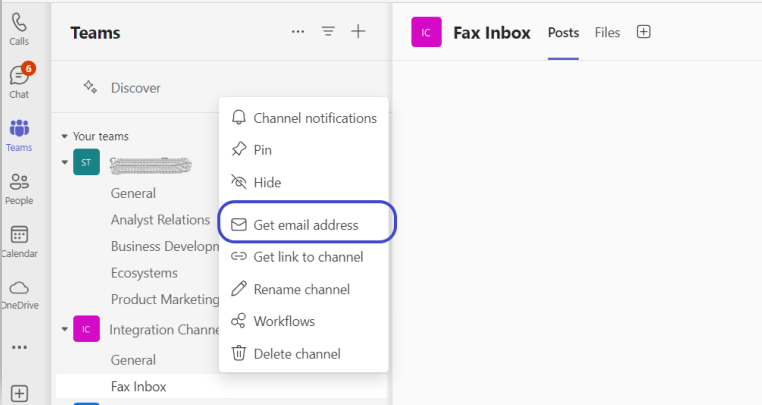
→ A pop-up window opens displaying the channel's email address.
-
Copy the email address. This address will be used to deliver the received faxes.
📌 If you want success and failure notifications in different channels, repeat the step for each channel and keep both addresses.
2. Configure fax notifications in Retarus EAS
The configuration steps differ depending on whether you are using Fax-for-Applications or Email-to-Fax.
Fax notifications for Fax-for-Applications
-
Log in to Retarus EAS.
-
Go to Administration - Fax Services - Faxolution for Applications.
-
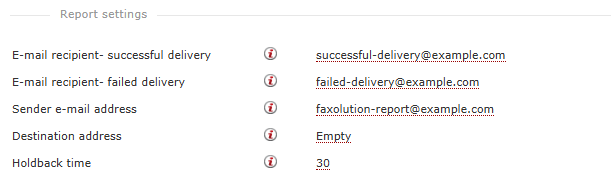
Locate the Report settings for fax jobs.
-
Enter the Teams channel email address in:
-
E-mail recipient – successful delivery
Paste the channel address that should receive success notifications. -
E-mail recipient – failed delivery
Paste the channel address that should receive failure notifications.
You may enter the same channel address for both fields to consolidate all notifications, or use separate channels for clearer triage.
-
Fax notifications for Email-to-Fax
-
Log in to Retarus EAS.
-
Go to Administration - Fax Services - Mail2Fax.
-
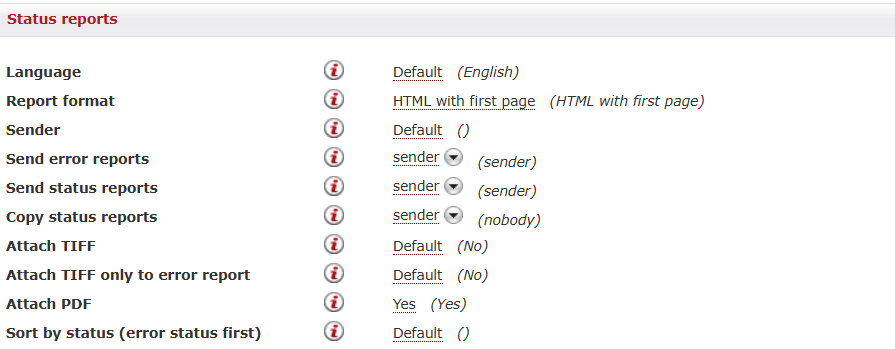
Locate the status report settings for fax jobs.
-
Enter the Teams channel email address in the Send status reports field.
-
Configure any additional options as required.
3. Test the integration
-
Send a test fax to your fax number.
-
Open the configured Microsoft Teams channel.
-
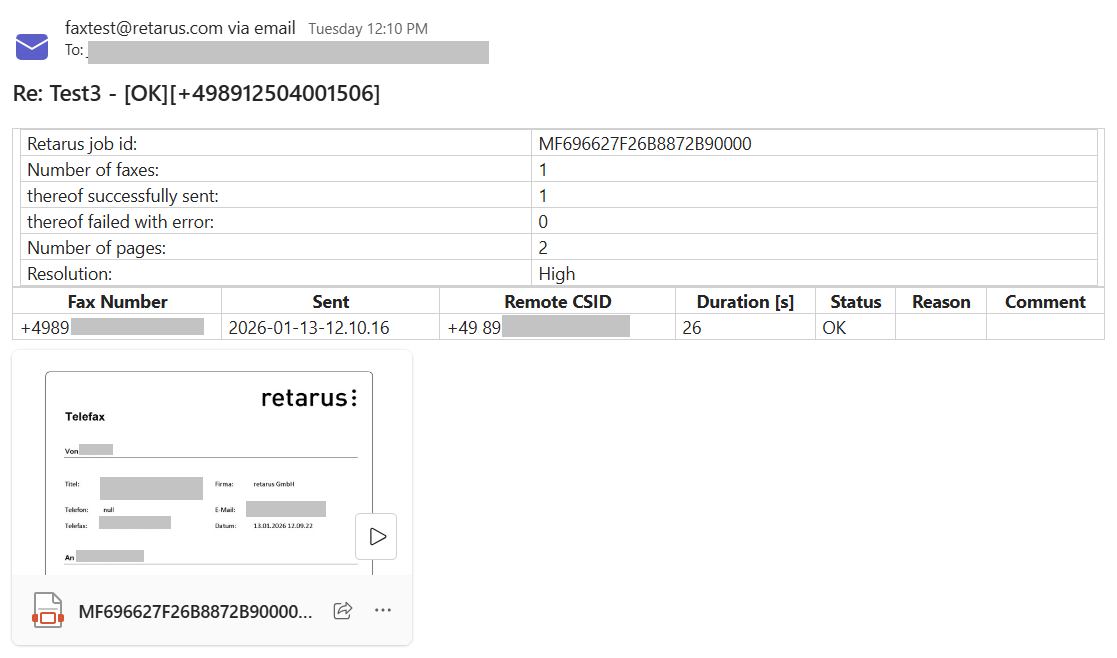
Verify that the success or failure notification appears as expected.
Example of a fax notification when sent via Email-to-Fax:
If the notification does not arrive:
-
Recheck the configuration in Retarus EAS.
-
Confirm the Microsoft Teams channel email address.
-
Send the test fax again.
Best practices
-
Set permissions carefully to ensure only authorized personnel can access the Microsoft Teams channel.
-
Regularly monitor and maintain the integration, and stay up to date with changes from both Microsoft Teams and Retarus.