
Large Email Handling
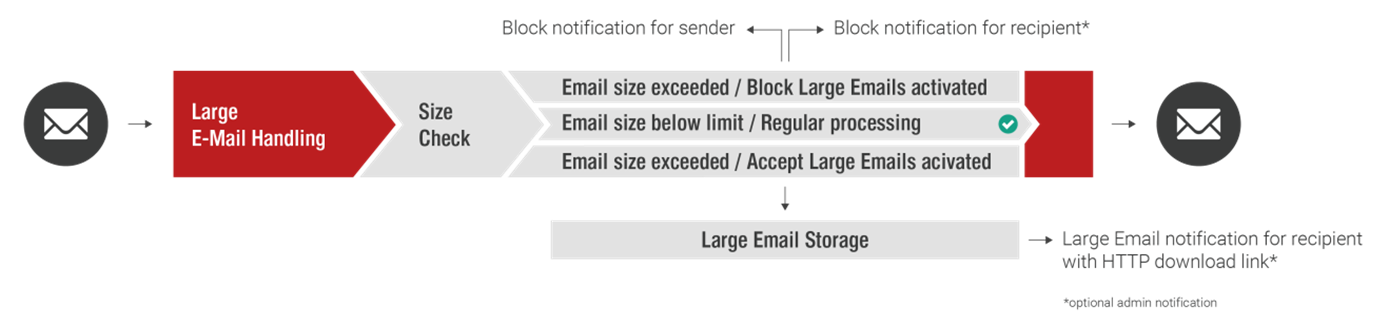
In general, messages with a size up to 250 MB are accepted by Retarus Email Security. Retarus Large Email Handling allows you to reliably block emails above a defined size, or alternatively, depending on your settings, to store them securely in Retarus' own datacenters. In the latter case, the recipient is notified by email and may release affected messages individually. This way, sensitive messages of several megabytes in size, such as applications, balance sheet calculations, patent documents, design drawings or credit applications, reach their destination directly without detours via potentially insecure web-based filesharing services. At the same time, unwanted emails above a certain size are reliably blocked, thus significantly reducing the load on your company's email servers.
Configuration
myEAS - Email Security - Configuration - Service Configuration - [Level] - Large Email Handling
Available settings:
-
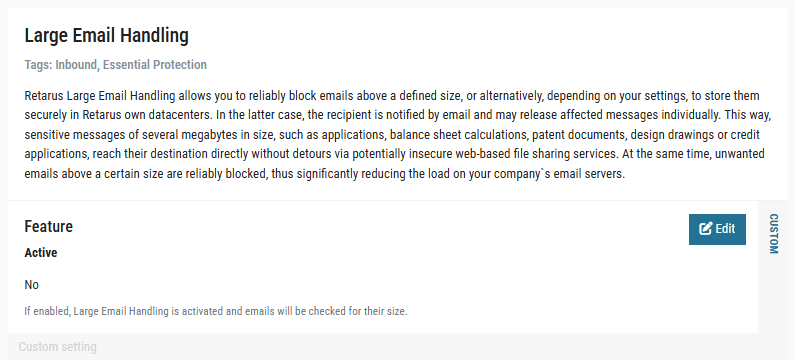
Feature
Enable or disable Large Email Handling. Only if enabled, the settings below are available -
Email Size Limit – KB Limit
Size limit defined in kilobyte (kb) or megabyte (mb). Maximum size limit is 256 MB. -
Delivery Settings – Move Large Emails to User Quarantine
If disabled (default setting), emails exceeding the size limit defined above will be rejected and the sender receives a Non Delivery Report (NDR). If enabled, an email exceeding the size limit will be accepted, but stored at Retarus in the recipient’s user quarantine. The recipient will receive a notification and may release the email from the quarantine. -
Recipient Notification
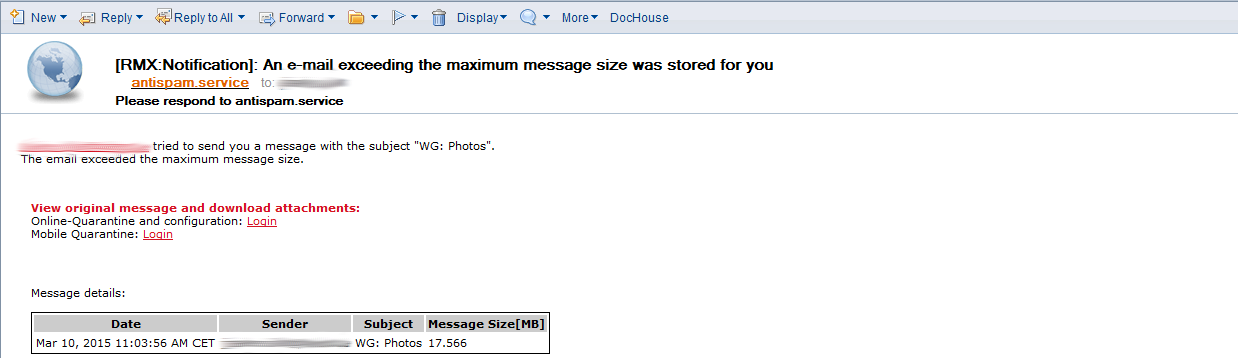
If enabled, the recipient will be notified when an email exceeds the configured size limit. As sender address of the notifications, antispam.service@retarus.de is used.
-
Admin Notification
If enabled, an administrator will be notified when an email exceeds the configured size limit. In this case, you have to configure a recipient email address of the administrator as well. -
Notification Language
Choose one of five available languages for the email notifications. -
Notification Timezone
Choose the timezone for the email notifications.
Outbound Recipient Restriction
By default, outgoing emails processed by Retarus may have up to 600 recipient addresses. If an email is exceeding this number, Retarus is rejecting the email for the recipients exceeding the number; it then depends on the configuration of your email server if/how the end user that tried to send the email is getting notified or if the mail server just does a retry for the rejected recipients and the end user does not notice this at all.
The Outbound Recipient Restriction feature allows you to configure another maximum number of recipients that Retarus accepts for Outbound emails, between 0 and 600 recipients as maximum.
If the number of configured maximum recipients is exceeded, either the complete email (for all recipients) or only for the exceeding recipients may be rejected, tempfailed or discarded silently – depending on your configuration. An Outbound quarantine option does not exist.
The feature may be configured on all hierarchy levels (customer, domain, profile, user).
If you would like to have the maximum recipient limit for Outbound emails adapted, please refer to the Retarus Support, as this cannot be configured via the myEAS portal at the moment.
Outbound Sender Restriction
The “Outbound Sender Restriction” is part of the basic Retarus Email Security portfolio and activated by default (for customers that started at Retarus from 2022 on).
The “Outbound Sender Restriction” allows you to restrict your Outbound traffic to “known sender domains/addresses” only. This security setting is activated by default for all customers that have been onboarded from November 2021 on.
-
“Known domains” include the ones that you have registered as Inbound domains, as well as the ones listed on a dedicated "Outbound Sender Allowlist".
-
When using the feature, it can also be configured if subdomains shall be included or not; this setting is then applied to all list entries. For all customers that have been onboarded from November 2021 on, by default also subdomains of the “known domains” are accepted.
-
Also, a dedicated “Outbound Sender Blocklist” exists to exclude domains/addresses explicitly.
-
On both lists, domains (also including subdomains) or email addresses may be added.
-
Unlike in other places, the Allowlist does not win over the Blocklist in all cases. Instead, the more specific entry always wins over the more general entry. For example, the setting for an email address wins over the setting for the corresponding domain.
-
Outbound emails with empty SMTP/Envelope From sender address (e.g., Non Delivery Reports (NDR)), are not blocked by default, even if the Outbound Sender Restriction is enabled. If this behavior was desired, it could be configured though.
Thanks to these characteristics, different requirements may be implemented. Example use cases:
-
If you’d like to allow Outbound traffic for all your Inbound domains only, you may activate the feature. If you would like to include any subdomains (not explicitly registered for Inbound traffic), you may enable this option as well.
-
If you’d like to allow Outbound traffic for an additional domain (not registered for Inbound traffic), you may put this domain on the “Outbound Sender Allowlist”.
-
If you’d like to block Outbound traffic for one of your Inbound domains, you put it on the “Outbound Sender Blocklist”.
-
If you’d like to block Outbound traffic for a certain domain (put on the Outbound Sender Blocklist), but now you would like to make one exception (=allow Outbound traffic) for a sub-domain or a single email address belonging to this domain, you may put the sub-domain or email address on the “Outbound Sender Allowlist”. This way, traffic is allowed for those senders, but blocked for all other senders belonging to the domain on the blocklist.
-
The other way around, if you’d like to allow Outbound traffic for one of your domains (registered for Inbound traffic or present on the Outbound Sender Allowlist), but now you would like to make one exception (=block Outbound traffic) for a sub-domain or a single email address belonging to this domain, you may put the sub-domain or email address on the “Outbound Sender Blocklist”. This way, traffic is blocked for those senders, but allowed for all other senders belonging to the domain registered for Inbound traffic or present on the allowlist.
Processing logic/hierarchy concerning block-/allowlist in combination with domains, subdomains and email addresses:
-
Check the email address first (most specific) on the allowlist and, afterward, blocklist.
-
Check the domain on allowlist and, afterward, blocklist.
-
If "subdomain included" option is activated, check for any parental domain on the allowlist and, afterward, blocklist.
Example for a combination of domains and subdomains on Allow-/Blocklist:
-
Configuration:
http://retarus.comon allowlist,block.retarus.comon blocklist. Option "Include sub-domains" enabled. -
An Outbound email from
block.retarus.comis received at Retarus → Result: Blocked. -
An Outbound email from
special.block.retarus.comorvery.special.block.retarus.comis received at Retarus → Result: Allowed
Configuration
(De-)Activation of the feature:
myEAS - Email Security - Configuration - Service Configuration - [Level] - Outbound Sender Restriction
Management of the dedicated Allow- and Blocklist:
myEAS - Email Security - List Management - Outbound Sender Restriction
The “Outbound Sender Restriction” is part of the basic Retarus Email Security portfolio and activated by default (for customers that started at Retarus from 2022 on).
The feature can be configured on customer level only.
Outbound Size Restriction
By default, outgoing emails processed by Retarus may have a size up to 250MB (256000kB).
The “Outbound Size Restriction” feature allows you to restrict the size of outgoing (Outbound) emails even further, if you want to allow for example a maximum size of 100MB only.
Emails exceeding your configured size (between 0 and 256000kB) are either rejected, tempfailed or discarded silently – depending on your configuration. An Outbound quarantine option does not exist.
The feature may be configured on all hierarchy levels (customer, domain, profile, user).
If you would like to have the maximum size for Outbound emails restricted to less than 250MB, please refer to the Retarus Support, as this cannot be configured via the myEAS portal at the moment.
Outbound TLS Enforcement
The “Outbound TLS Enforcement” allows you to make sure that Outbound emails to defined recipient domains are transferred with Transport Layer Security (TLS) enabled.
The feature can be configured on customer level only.
This feature is part of the basic Retarus Email Security portfolio. It can be used without additional cost, but has to be configured by Retarus upon request. It cannot be configured via the myEAS portal yet.
Inbound Recipient Restriction
By default, incoming emails processed by Retarus may have up to 300 recipient addresses (=user addresses belonging to this customer number). If an email is exceeding this number, Retarus is by default tempfailing the recipients from number 301 onwards. It then depends on the configuration of the sending MTA how this is handled; by default, a retry is done and the remaining recipients are processed in the next session.
The “Inbound Recipient Restriction” feature allows you to configure a lower maximum number of recipients that Retarus accepts for Inbound emails (between 0 and 300 recipients as maximum) and a desired reaction. If the configured maximum number of recipients is exceeded, either the complete email (for all recipients) or only for the exceeding recipients may be rejected, tempfailed or discarded silently.
Important
-
A customer-specific MX record for all your domains is mandatory before activating this feature. See MX record for details.
-
The feature may only be configured on customer level.
If you would like to have the maximum recipient limit for Inbound emails adapted, please refer to the Retarus Support, as this cannot be configured via the myEAS portal at the moment.
Inbound Sender Restriction
The “Inbound Sender Restriction” allows you to make sure that defined mailboxes of your organization can only be reached by defined external senders (email addresses, domains, IPs or IP nets).
For example, it could be configured that a newsletter sent from a defined external source IP address is accepted for a recipient address used as an internal distribution list containing all your employees, but all other Inbound emails from other IP addresses to this recipient address are getting rejected.
The feature can be configured on customer level only.
This feature is part of the basic Retarus Email Security portfolio. It can be used without additional cost, but has to be configured by Retarus upon request. It cannot be configured via the myEAS portal yet.
Inbound Size Restriction
By default, incoming emails processed by Retarus may have a size up to 250MB (256000kB).
The “Inbound Size Restriction” feature allows you to restrict the size of incoming (Inbound) emails even further, if you want to allow for example a maximum size of 100MB only. Emails exceeding your configured size (between 0 and 256000kB) are either rejected, tempfailed or discarded silently – depending on your configuration.
Important
-
A customer-specific MX record for all your domains is mandatory before activating this feature! See 2. MX Record for details.
-
The feature may only be configured on customer level.
If you would like to have the maximum size for Inbound emails restricted to less than 250MB, please refer to the Retarus Support, as this cannot be configured via the myEAS portal at the moment.
Inbound TLS Enforcement
The “Inbound TLS Enforcement” allows you to make sure that Inbound emails from defined senders (email addresses, domains, IPs or IP nets) are only accepted if they are transferred with Transport Layer Security (TLS) enabled.
The feature can be configured on customer level only.
This feature is part of the basic Retarus Email Security portfolio. It can be used without additional cost, but has to be configured by Retarus upon request. It cannot be configured via the myEAS portal yet.