
Resend an undelivered fax from the main page of your Outbound folder. This is helpful when delivery fails, for example, because of an invalid fax number or a transmission timeout.
📌 The Resend action is available only for faxes with an undelivered status.
You can resend a fax in either of these ways:
-
Hover over a fax message and click Resend.
-
Preview a fax message and click Resend.
Both options open the Resend fax dialog.
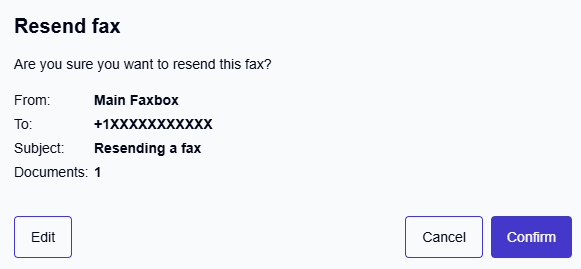
Resending without changes
The Resend fax dialog shows a summary of the fax: the sender, recipient number, and attached documents.
To resend the fax immediately with the same details, click Confirm:
-
The fax is sent right away.
-
The resent fax is added as a child item under the original failed fax, grouping both into a single thread in the Outbound folder.
You can track the status of the resent fax in the Outbound folder. If it is delivered successfully, the thread moves to the Resolved tab automatically.
Editing before resending
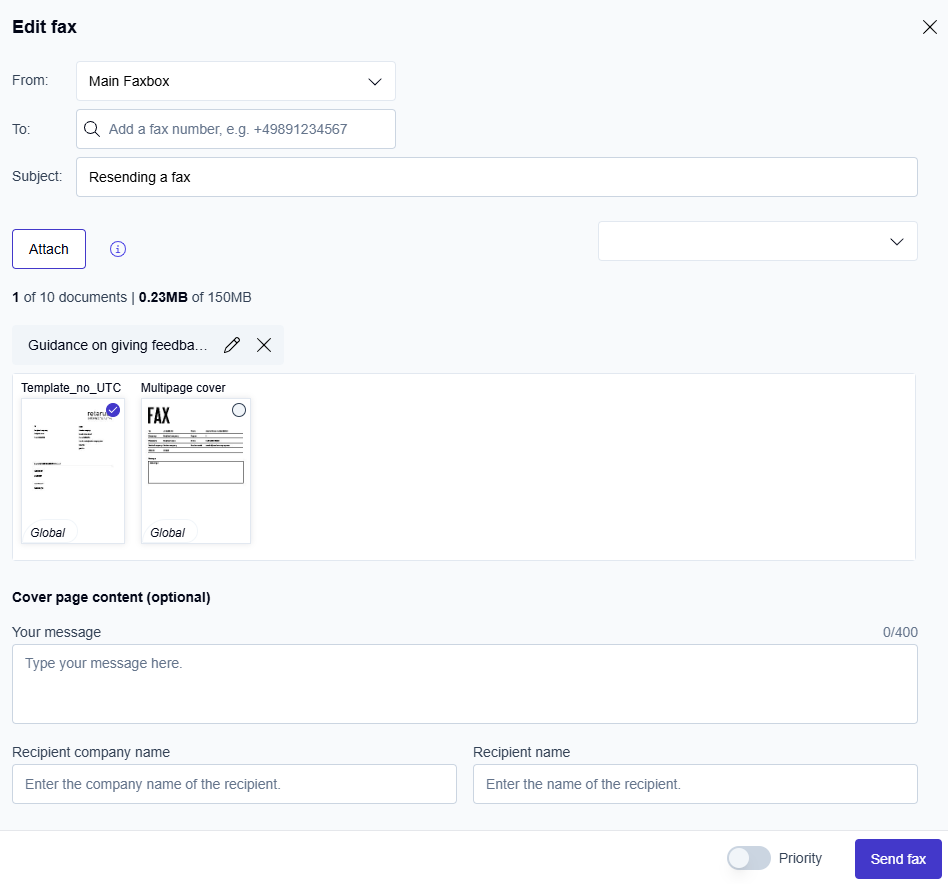
If you want to modify the fax before sending, for example, to correct a wrong number, click Edit in the Resend fax dialog. This opens the Edit fax form.
-
In the To: field, update the recipient's fax number if needed. Use the format “+” followed by the country code and fax number, with no spaces (for example,
+12013770XXX). -
In the Subject field, update the subject if needed.
-
Review the attachments.
Up to 10 attachments are supported, including documents from the document library and newly uploaded files. To edit the attachment:-
Click the pen icon

-
Make your changes in the PDF Editor.
-
Click Save to apply your changes and return to the Edit fax form.
-
-
Optional: Configure the cover page.
If cover pages are available for your account, select the cover page you want to use. -
Optional: Set delivery options.
Turn on Priority to send the fax ahead of others.
📌 Additional charges apply to priority delivery. Confirm with your administrator that your organization allows and approves priority delivery.
-
Click Send fax.
→ The resent fax is added as a child item under the original failed fax, grouping both into a single thread in the Outbound folder. If you edited the fax document before sending, the action is recorded as Edited and resent in the thread’s Action column and in the activity log.