
You can restore deleted faxes from the Trash to the Inbox within 30 days of deletion. Each time a fax moves to the Trash, the 30-day period restarts. A restored fax also receives a new retention period, calculated from the restore date. For more information, see Retention period.
Ways to restore/undelete faxes
While viewing the faxes on the main page of any folder,
-
By selecting one or multiple faxes
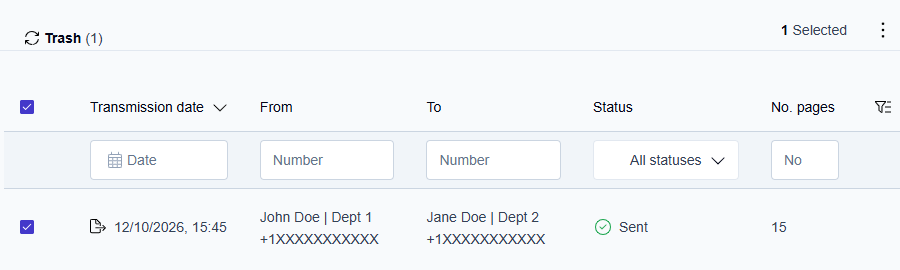
Click the checkbox next to any fax messages you want to restore. The More actions icon pops up in the top right corner of the trash folder. Click the More actions icon (
→ For step-by-step instructions, see Restore one or multiple deleted faxes below. -
While hovering over a fax
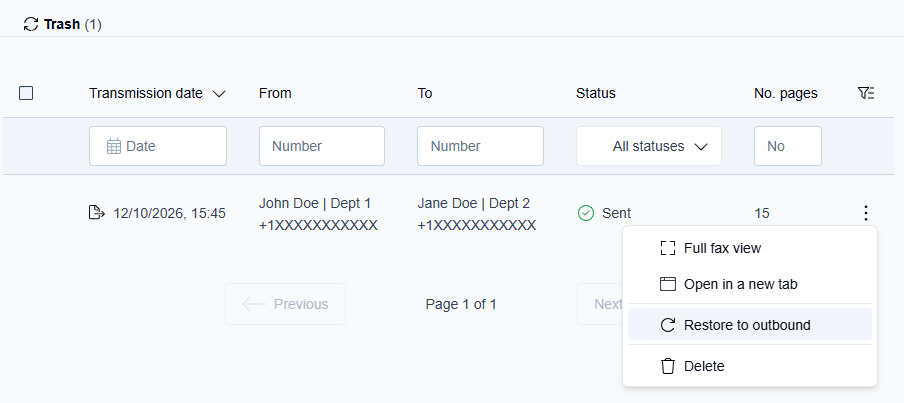
Hover over the fax message to be restored. Click the More actions icon (
→ For step-by-step instructions, see Restore a fax when hovering over a fax message below. -
While previewing a fax
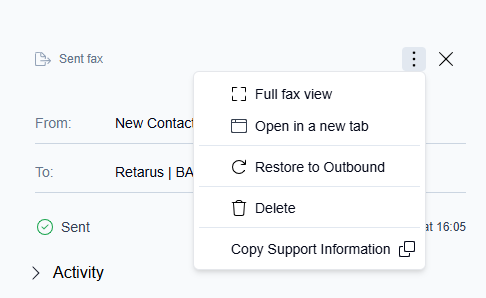
Click to select a fax message in the trash folder to preview it and restore it. From the fax preview window, click the More actions icon (
→ For step-by-step instructions, see Restore a fax when previewing a fax message below.
Restore one or multiple deleted faxes
-
Click the checkbox next to any faxes you want to restore from the trash folder.
-
Click the More actions icon (
→ The selected messages are restored to the original folder. If you don’t see the fax messages you just restored, click the window refresh icon (
Restore a fax when hovering over a fax message
-
Navigate to the fax message you want to restore.
-
Click the More actions icon (
→ The More actions dropdown menu opens.
-
Scroll down to select Restore to inbound/Restore to outbound.
→ The selected fax is restored to the original folder from the Trash folder. If you don’t see the fax message you just restored, click the window refresh icon (
Restore a fax when previewing a fax message
-
Click to select and preview any fax message in the trash folder view.
→ The fax opens in the document preview window on the right side of the screen. -
Click the More actions icon (
→ The More actions menu opens.
-
Scroll down to select Restore to inbound.
→ The selected fax is restored to the Inbound folder from the Trash folder. If you don’t see the fax message you just restored, click the window refresh icon (