
Undelivered outbound faxes from Retarus Cloud Fax services can be automatically sent to the Fax Portal for centralized management and recovery. In the Fax Portal, you can resend, edit and resend, forward, send via email, or manually resolve these faxes.
If an outbound fax cannot be delivered because of a transmission issue, such as a busy line, no answer, remote error, or carrier or network problem, the system sends the fax to the Fax Portal after all configured retry attempts are exhausted.
📌 The original record in the source service remains unaffected. The Fax Portal receives a copy of the undelivered fax for recovery purposes.
Supported services
This feature applies to faxes sent through any Retarus Cloud Fax outbound service, including:
-
Enterprise Fax Portal
-
Email-to-Fax
-
Fax-for-Applications
-
Faxolution for SAP
-
Faxolution for Windows
-
WebExpress
-
Fax AutoReply
Enabling undelivered fax collection
This feature can be enabled or disabled for your account.
-
Enabled
Undelivered outbound faxes are automatically sent to the Fax Portal and remain in the originating service. The original record in the source service is unchanged. -
Disabled
Undelivered outbound faxes remain only in the originating service.
Contact your administrator or Retarus Support to configure this setting for your account.
Accessing undelivered faxes
To view undelivered faxes in the Fax Portal:
-
In the left sidebar, expand your faxbox and select Outbound.
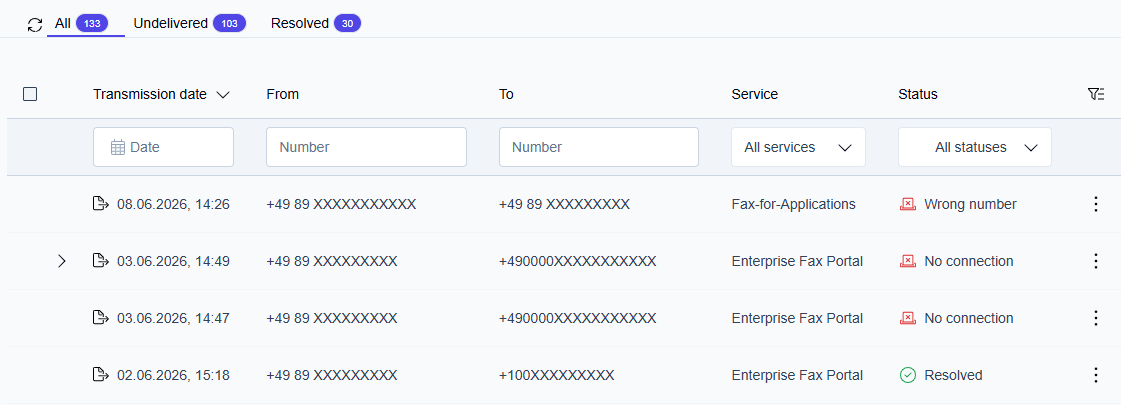
→ The main area displays the Outbound list with three filter tabs at the top: All, Undelivered, and Resolved.
Outbound filter tabs
The Outbound folder contains three filter tabs that let you focus on specific fax states.
All
Shows every fax in the Outbound folder:
-
successfully delivered faxes
-
undelivered faxes
-
resolved threads
Undelivered
Shows only failed faxes and threads that have not yet been resolved. Use this tab to find faxes that still require action.
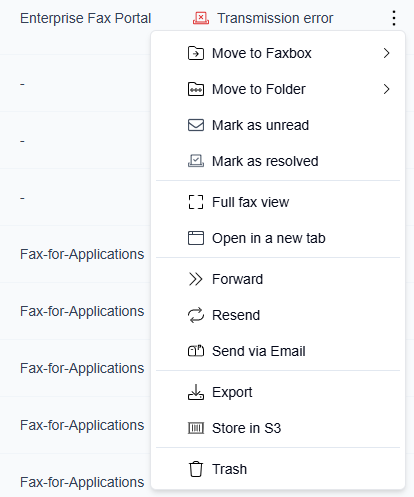
Available actions on faxes in this tab:
-
Resend (with an option to edit the fax before sending)
-
Forward
-
Send via email
-
Mark as resolved
Resolved
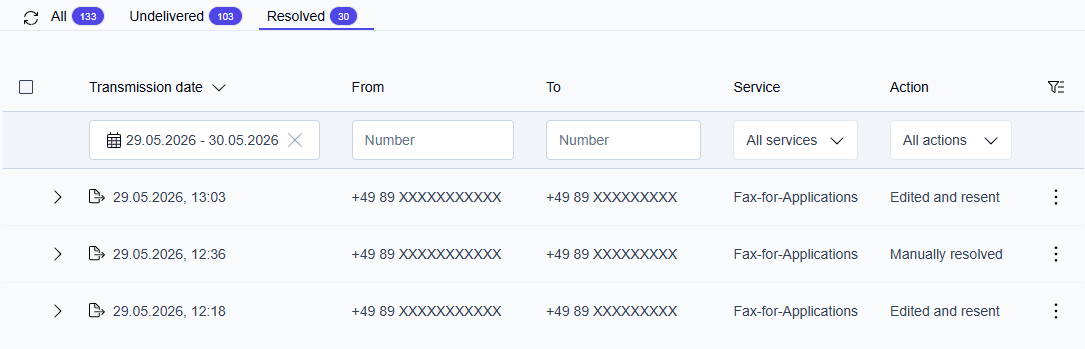
Shows all resolved threads and successfully delivered faxes. A thread appears here when:
-
A resend attempt succeeds
-
An edit and resend attempt succeeds
-
A forward attempt succeeds
-
The fax is sent via email
-
The user manually marks the thread as resolved
Threaded view for failed faxes
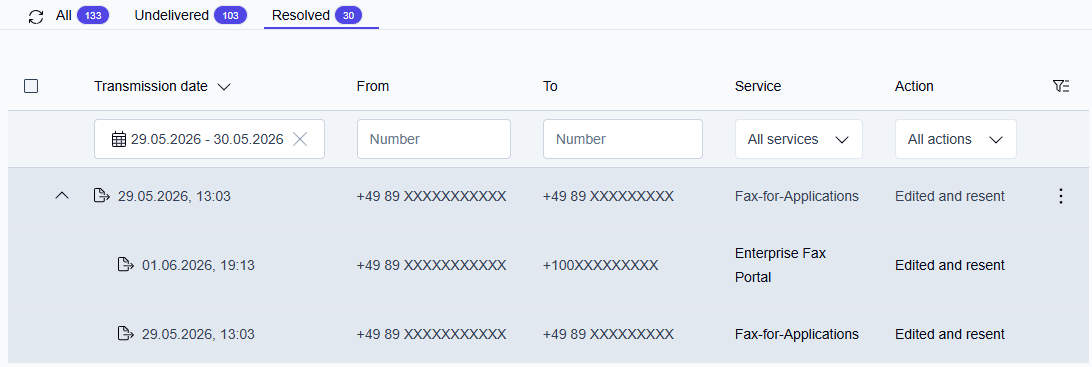
When you take an action on an undelivered fax, such as resending, forwarding, or sending via email, the original fax and all subsequent attempts are grouped into a single thread. Each thread represents one logical fax case.
Thread structure
-
Parent row
The original undelivered fax. Displays the transmission date, sender, recipient, service, and status. -
Child rows
All follow-up attempts (resend, edit and resend, forward, send via email) are listed under the parent.
Threads appear only for faxes that were undelivered and had at least one follow-up action taken. Successfully delivered faxes that had no delivery failure are always displayed as standalone entries without a thread.
Expanding and collapsing a thread
Threaded entries are marked with a chevron ( > ) to the left of the fax icon.
-
Click the > chevron to expand the thread and view all child attempts with their individual statuses.
-
Click the chevron again to collapse the thread.
Thread resolution
A thread moves from Undelivered to Resolved when any of the following occurs:
|
Resolution type |
How it happens |
|---|---|
|
Resent |
A resend attempt is delivered successfully. |
|
Edited and resent |
An edit and resend attempt is delivered successfully. |
|
Forwarded |
A forward attempt is delivered successfully. |
|
Sent via email |
The fax is sent via email. |
|
Manually resolved |
You select Mark as resolved. |
Once resolved, the thread moves to the Resolved tab. The Action column on the parent row shows which action resolved the thread. When the thread is expanded, the action is also visible on each child row, giving a full history of all attempts.
Columns
All and Undelivered tabs
|
Column |
Description |
|---|---|
|
Transmission date |
Date and time the fax was sent |
|
From |
Sender fax number |
|
To |
Recipient fax number |
|
Service |
Retarus service used to send the fax (visible only for faxboxes with the Fax Failure Handling feature enabled) |
|
Status |
Error category icon and short error code |
Resolved tab
|
Column |
Description |
|---|---|
|
Transmission date |
Date and time the fax was sent |
|
From |
Sender fax number |
|
To |
Recipient fax number |
|
Service |
Retarus service used to send the fax (visible only for faxboxes with the Fax Failure Handling feature enabled) |
|
Action |
The action that resolved the thread. Possible values:
Displays "-" for the original failed attempt in a thread, and for a fax delivered on the first attempt (status Sent) shown without a thread. |
Resending undelivered faxes
After you locate an undelivered fax in the Outbound folder, you can resend it directly from the list. See Resend a fax for step-by-step instructions.
Marking a fax thread as resolved manually
If you have confirmed that a failed fax no longer needs to be resent, for example, because the recipient was contacted by another means, you can manually mark the thread as resolved. See Mark a fax as resolved for step-by-step instructions.
Activity log
Recovering an undelivered fax adds these entries to the activity log on the single fax view:
-
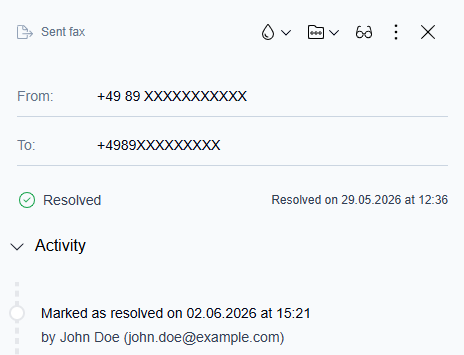
Marked as resolved
Recorded when a user manually resolves a fax thread.
Example: Marked as Resolved on 02/06/2026 at 15:21 by John Doe (john.doe@example.com)
-
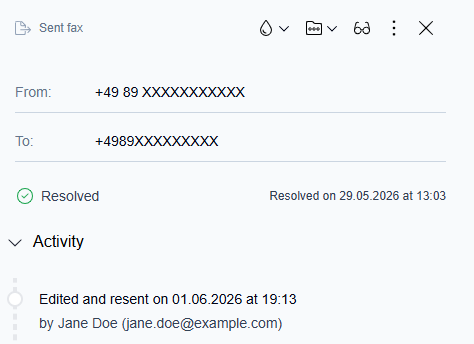
Edited and resent
Recorded when a user edits and resends a fax.
Example: Edited and resent on 29.05.2026 at 19:13 by Jane Doe (jane.doe@example.com)
All other fax activities continue to be recorded as usual and are displayed on the parent fax row.