
The Fax Portal groups fax transmission errors into several categories and displays them in the Status column of the Outbound folder. Each category covers one or more underlying technical error codes from the originating fax service.
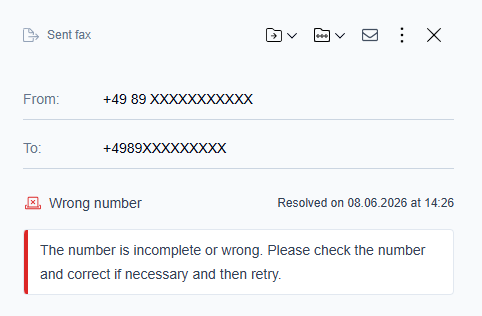
When you open an individual fax, the category label and a suggested action are displayed as fixed text to help you resolve the issue.
Status categories
|
Category |
Recommended action |
|---|---|
|
Wrong number |
The destination number is invalid or incomplete. Verify the number, correct it if needed, and resend the fax. |
|
Busy |
The destination line was busy. Retry later. If the issue continues, verify the number. |
|
No connection |
A connection to the destination could not be established. Verify the number and resend the fax. |
|
Transmission failed |
The fax could not be transmitted successfully. Retry the transmission. If the issue persists, contact support. |
|
Invalid job |
The fax job was invalid or incomplete, used an unsupported document type, or was submitted by an unauthorized user. Review the job details, correct any issues, and resubmit. |
|
Processing error |
An error occurred while processing the fax. Retry the job. If the issue persists, contact support. |
|
Number blocked |
The destination number is blocked, either by an opt-out list or by your fax administrator. Contact your administrator if you believe this is an error. |
|
Canceled / expired |
The fax was canceled or expired before delivery could be completed within the allowed time. Resend the fax if needed. |
|
Rendering error |
One or more documents could not be rendered. Confirm that the file type is supported and that the document is not password-protected or corrupted, then resubmit. |
|
Other |
This category includes any error code not listed above. Refer to the specific error details or contact support for assistance. |
Filtering by status
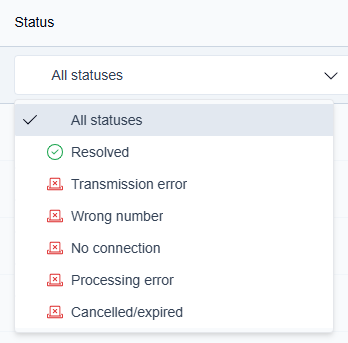
You can filter the Outbound list by status using the Status dropdown above the list. The filter is dynamic. It shows only the error categories currently present in the list and updates automatically as faxes change state.
Resolved always appears in the filter regardless of the current list content. Sending is never shown in the filter.